Expressive E Osmose CE 61 Review: Is It Worth It?

Aug 10
19 min read
Updated: 1 day ago
We first got our hands on the Osmose CE 61 at Superbooth 2026. After only a few minutes with the instrument, one thing became immediately clear: we wanted one in the studio. And, well, now we have one. Before going any further, though, one point needs clearing up. The Osmose CE 61 is not a synthesizer. It doesn't contain a built-in sound engine, onboard presets, oscillators, filters, or a complete signal path like the original Expressive E Osmose. Instead, it's a 61-key MPE MIDI controller designed to work alongside a computer, a DAW, software instruments, and external sound sources. So after spending some real time with it in the studio, this review is about one simple question: does the Osmose CE 61 still deliver the magic of the original when the synth engine is gone?
Note: This post contains affiliate links. If you choose to buy through them, I’ll get a small kickback - at no extra cost to you. It helps me keep Noise Harmony going. Thank you!

"It's just a controller" sounds kind of underwhelming after all the hype surrounding the Osmose name. But once you actually start playing it, and once you realize that every single key is its own expressive surface that you can push into, bend, wiggle, and shape, it starts feeling a lot more like an actual instrument than any regular MIDI keyboard I've used before. It's not really built for entering notes. It's built for performing them.
So the real question is whether the Osmose CE still holds up without the synthesis engine that made the original so special, and whether it's actually useful in a real studio workflow. I've had one on the desk for a while now, driving Serum 2, Vital, and a Korg Minilogue XD, and that's really where this review comes from: not just looking at the feature list, but seeing how the keyboard actually fits into the way I make music.

Table of contents
What MPE actually gives you
MPE, or MIDI Polyphonic Expression, expands the traditional MIDI protocol by allowing expressive control on a per-note basis. On a conventional MIDI keyboard, most performance parameters operate globally. If you move the pitch bend wheel, the whole chord bends. If you apply aftertouch, it often affects every note you're holding at the same time. That system works perfectly well for most traditional keyboard playing, but it becomes limiting once you want individual notes inside a chord to behave differently.

You might be thinking that this sounds basically like polyphonic aftertouch, and there is definitely some overlap, but MPE goes further. Poly aftertouch gives you independent pressure for each note, while MPE can also provide independent pitch bending, timbre control, and other forms of gestural expression on a per-note basis. That might not sound revolutionary on paper, but in practice it changes the relationship between your hands and the sound quite dramatically.
Traditional MIDI keyboards are excellent tools, but they can't easily reproduce the kind of nuance you get from instruments like guitar, violin, brass, or even the human voice. Those instruments constantly change pitch, volume, tone, articulation, and intensity during a single note. On a traditional keyboard, a lot of that movement usually gets added afterward with automation, modulation wheels, or additional controllers. MPE lets you perform a much larger part of that expression directly while you're playing.
The original Osmose was such a big deal because it combined this multidimensional keyboard concept with Haken Audio's EaganMatrix synthesis engine inside the instrument itself. It was a complete standalone expressive instrument. The Osmose CE takes the other route. At the time of writing, it costs around €1,100 on Thomann, which still puts it firmly in premium territory, but it's noticeably less expensive than the full Osmose. If you want to sit down, connect headphones, and play without touching a laptop, the original Osmose still makes more sense. If you're already working primarily inside a DAW and have a large collection of software instruments, the CE might actually be the smarter option.

Not a fan of reading long reviews? You can also watch our full Osmose CE 61 video review on the Noise Harmony YouTube channel and see everything in action.
Build quality and design
Visually, the CE has its own identity. The white aluminum top panel is clean and almost slightly clinical, but the black chassis underneath stops the whole thing from feeling too sterile. There's also a subtle sci-fi character to it. It feels contemporary rather than retro, and visually it fits very naturally into a modern studio environment.
Xfer Serum 2 | 155+ Presets | „Multiverse Bundle” [BUNDLE]
€64.00€54.40
Buy Now
Overall, the build feels solid, although my main reservation concerns the keys themselves. They're slightly more plastic-feeling than I'd expect from an instrument at this price, and occasionally there's a little bit of mechanical roughness in the action. My guess is that this is partly the engineering reality of fitting lateral movement, pressure sensitivity, and multiple expressive dimensions into every individual key. There are simply far more moving parts here than in a standard MIDI controller.
The important part is that this doesn't really get in the way once you start playing. Quite the opposite: the keyboard responds beautifully during a performance, and you can genuinely feel parameters moving underneath your fingers in real time. What I can't judge yet is long-term durability. I play a lot of progressive material and fairly fast technical passages, which can put a lot of stress on a key mechanism. How the Osmose CE keybed feels after several years of heavy use is something I simply can't tell you at this stage.

The 61-key format is a major advantage for me. A smaller version would probably work perfectly well in a compact setup, but 61 keys give you much more freedom for two-handed playing, wider voicings, cinematic arrangements, and more complex parts without constantly reaching for octave buttons. On an expressive instrument where every single key acts as its own performance surface, having more physical space to work with simply makes sense.
The interface itself is a bit less impressive. The screen can be noticeably laggy, and the encoders feel stiffer than I expected, without the smoothness you get from better endless encoders on some other premium gear. Neither issue is serious enough to interfere with using the instrument, but if you've spent time with really good hardware controls elsewhere, the difference is immediately noticeable. The overall layout is otherwise quite restrained: display, encoders, buttons, transport controls, USB-C, traditional MIDI DIN, and two pedal inputs. There's no Bluetooth, which personally doesn't bother me at all in a studio controller.

One detail I genuinely didn't expect is that the CE line is manufactured in Europe, specifically in Poland. In a market where a huge amount of music technology is manufactured in Asia, seeing "Made in Poland" on a piece of equipment like this stood out. Speaking as Poles ourselves, it also hit a little differently because it's simply not something we're used to seeing on electronic instruments at this level. Make of it what you will, but it did add to the impression that the product had been built with some care.

Portability is also better than I initially expected. When we first picked it up, the Osmose CE felt fairly substantial, but once we compared it directly with other keyboards, that impression changed. My 88-key Korg Kronos weighs nearly twice as much, so compared with a typical workstation keyboard, the CE is surprisingly manageable. It definitely takes up real desk space in the studio, but it's not the kind of instrument that would make me think twice about putting it in the car and taking it to a gig.
The keybed and gestures
The keybed is really the reason this instrument exists. On a normal MIDI keyboard, each key gives you velocity, note length, and perhaps aftertouch. On the Osmose CE, every key becomes its own performance surface. You still play notes in the traditional way, but you can also push deeper into the key, move it horizontally, add vibrato, change timbre, alter the intensity of a sound, and even influence the way a note ends. All of that happens per note and independently.
There are eight main gestures to learn. Tap works like a normal key press. Press & Tap lets you push deeper into the key while playing to introduce an additional layer or variation. Pitch allows you to move an individual key left or right and bend only that note. Aftertouch gives you continuous pressure control after the note has already been triggered, with much more resolution than you'd normally expect from a conventional keyboard.
Then there are some of the more distinctive gestures. Shake lets you move a key rapidly from side to side to create a vibrato-like effect. Strum uses different pressure zones to introduce changes in velocity or layered sounds. Portamento lets you create smooth transitions between notes through pressure rather than relying on a conventional wheel or fixed glide setting. Even Note-off can become expressive, because the speed at which you release a key can affect the tail of the sound.

The important thing is that none of these gestures are locked to one fixed response. Pitch bend sensitivity, pressure response, vibrato range, and other parameters can be adjusted to fit the way you actually play. If you have a lighter touch, want a more dramatic pitch range, or need to reduce sensitivity so that chords don't accidentally wobble, you can tune the keybed accordingly. That's important because the keyboard doesn't force you to completely adapt your technique to it. To some extent, you can also adapt the instrument to your own playing style.
Latency is another concern that often comes up when people talk about MPE controllers, and in my experience this isn't an issue here. I don't feel any meaningful delay between making a gesture and hearing the response from the software. You move the key, apply pressure, or introduce vibrato, and you hear it immediately. On an instrument that depends so heavily on tiny finger movements, even a small amount of noticeable latency would ruin the illusion of playing something responsive and organic, so this is a very important part of why the Osmose works.
There is, however, a real learning curve. This is not an instrument you fully understand in five minutes. At first you'll probably bend notes further than intended, apply too much pressure, or accidentally trigger gestures that you weren't trying to use. That's part of the process. The keyboard captures much more information than a conventional controller, which also means your fingers need some time to learn how much movement is enough.
Setup and first configuration
The basic setup is relatively straightforward. You can connect the Osmose CE to a computer over USB-C, select it as a MIDI input, open a compatible instrument, and start playing. The more interesting part begins when the software you're using is actually configured to respond to MPE. With compatible presets in Serum 2, Vital, or the Ctrl-e ecosystem, pressure, pitch movement, and other gestures can already be integrated into the patch, so the connection between what your fingers are doing and what you're hearing can feel very immediate.
The DAW side requires one additional step if you want the hardware controls to behave properly. Expressive E provides integration scripts for supported DAWs, and it's worth installing the appropriate one before you start setting everything up. Without it, the Osmose CE will still work as a MIDI controller, but transport control, navigation, and parameter mapping may not behave the way they're supposed to. It's not a complicated process, but it's one of those small things that could easily be overlooked if you simply plug the keyboard in and expect every function to be mapped automatically.
The Ctrl-e software ecosystem
Because the Osmose CE doesn't have its own internal synthesis engine, the software ecosystem becomes much more important than it would be on the original Osmose. That's where Ctrl-e comes in. The system gives you access to more than 900 expressive presets designed around the Osmose keyboard, which helps the CE feel more like a complete instrument rather than simply an unusual MIDI controller that you need to configure from scratch.

I have to be honest, though: the preset library itself didn't completely win me over. That's partly personal taste, because as a sound designer I usually have a fairly specific idea of what I want from a patch, and quite a lot of the library just isn't something I would naturally reach for in my own productions. That said, many of the presets do an excellent job of demonstrating what the keyboard is capable of. Even if the sound itself isn't something I would use in a finished track, it can still show you how pressure, pitch movement, and multiple gestures can become part of the actual design of a sound rather than simply modulation added on afterward.
That's probably the biggest value of Ctrl-e for me. The best presets make the expressive controls feel like an integral part of the instrument. Pressure might change harmonic density, bring in another layer, alter the timbre, or transform the character of the sound rather than simply opening a filter. That can give you a lot of ideas if you're interested in designing your own MPE patches later.
There is one strange limitation in the hardware workflow. The Osmose CE's screen doesn't show full preset names, only numbers and bank positions. Browsing inside the plugin GUI is perfectly manageable, but if you're switching sounds directly from the keyboard and trying to stay away from the computer screen, you end up remembering numbers rather than reading the actual patch name. It's a relatively small issue, but on a device that relies on its display for navigation, it feels like an odd omission.

Another thing that's easy to overlook is that many of the synth engines used in the Ctrl-e ecosystem, including Vital, are available for free. That's actually a significant advantage if the Osmose CE is your first real step into MPE. You don't necessarily need to buy another expensive software instrument immediately after spending more than a thousand euros on the controller. Vital is already a very capable synthesizer, and paired with the CE's expressive controls, it gives you a lot of room to explore MPE-specific sound design without adding another major expense.
Performance tools
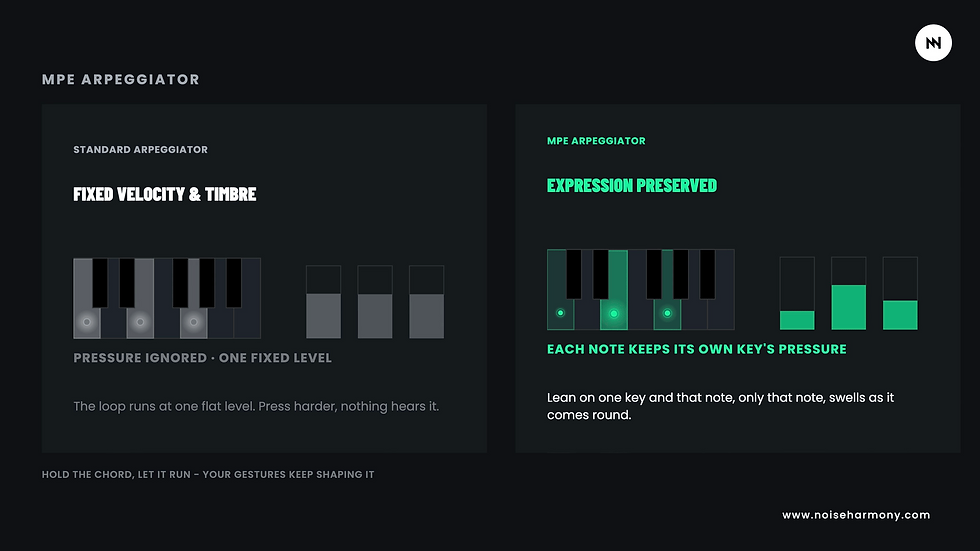
Two of the performance features deserve specific attention. The first is the MPE Arpeggiator. A normal arpeggiator generally cycles through the notes of a chord according to a fixed pattern, but here expressive information can remain part of the individual notes. In practice, that means you can hold a chord, let the arpeggiator run, and still use pressure or other gestures to influence how certain notes behave. It gives the pattern more movement and dynamic control than you'd normally get from a standard arpeggiator.
The second is Press Glide, which approaches pitch transitions differently from traditional portamento. Instead of simply applying a fixed glide between two notes, pressure becomes part of how the transition happens. The result can feel more vocal or string-like, and I find it particularly useful for expressive leads and bass parts where a conventional synthesizer glide can sometimes feel too mechanical.

There is also one important omission: the Osmose CE doesn't offer native split or zone functionality. If you're working entirely within Ctrl-e, you can't simply divide the keyboard into two separate areas directly from the device or plugin. In practice, this hasn't been a major problem for me because I usually layer sounds rather than split them. If I do need a proper keyboard split, I simply build it at project level inside the DAW by creating two tracks with different key ranges and feeding both from the same Osmose MIDI input. So the functionality is achievable, but you have to create it yourself.

I've also built several patches in Serum 2 and Vital specifically around the Osmose CE's expressive controls, using pressure, timbre, pitch gestures, and modulation as part of the sound itself. They're available for free at noiseharmony.com.
It's not limited to MPE instruments
One of the most useful things about the Osmose CE is that you don't need to restrict yourself to dedicated MPE instruments. Pressure, aftertouch, and other controls can be mapped to standard MIDI CC values, which means you can use the keyboard expressively with a much wider range of software and hardware. As a practical example, I currently have a Korg Minilogue XD connected with pressure controlling filter cutoff and oscillator volume. The Minilogue isn't suddenly transformed into a full MPE synthesizer, but it becomes noticeably more responsive and expressive to play.

I think this is one of the strongest real-world arguments for the Osmose CE because it means you don't have to rebuild your entire studio around MPE. It can still function as a normal MIDI keyboard for chords, pads, synth parts, and conventional software instruments, while the additional expressive controls are available whenever the instrument supports them or whenever you choose to map them manually.
If you're connecting the Osmose to external hardware, one practical tip is to search for an existing MIDI CC map for your particular synth before manually assigning everything. A lot of musicians have already documented these mappings, so instead of experimenting to discover which CC number controls which parameter, you can often start from a ready-made map and save yourself a considerable amount of setup time.
The sustain pedal caveat
There is one limitation worth knowing about if you use a sustain pedal heavily. With many MPE presets, sustain doesn't always behave the way you'd expect from a traditional keyboard. The note itself remains held, but pressure and aftertouch values aren't necessarily frozen at the moment the pedal is pressed, so the sound can suddenly become quieter or change character while you're sustaining it.
There is a useful workaround of sorts. The Osmose CE has two pedal inputs, and both can be freely assigned to MIDI CC values. If traditional sustain isn't particularly useful for a specific expressive patch, you can instead use those pedal inputs for other parameters and effectively gain two additional expression controls operated with your feet. It doesn't completely solve the sustain behaviour, but it does turn the flexibility of the pedal inputs into something genuinely useful.
Using the Osmose CE in a real studio workflow
This is probably where the Osmose CE makes the biggest difference for me. With a traditional MIDI keyboard, I might record the notes first and then add automation afterward for filter movement, volume, pitch, or timbre. With the Osmose CE, much more of that movement can become part of the original performance. Instead of recording a static line and then making it expressive later, you can perform the expression together with the notes.
That doesn't necessarily make everything easier. Because the keyboard captures more information, it also captures more mistakes. If you accidentally bend a note, press too hard, or introduce too much movement, that becomes part of the take as well. During the first sessions, I found myself having to pay much more attention to how much pressure and horizontal movement I was applying. But once you start gaining control over those gestures, the benefit becomes much clearer.
Not a fan of reading long reviews? You can also watch our full Osmose CE 61 video review on the Noise Harmony YouTube channel and see everything in action.
With Serum 2 and Vital, for example, a patch can become something much closer to a playable instrument rather than a static preset. You can move between softer and more aggressive versions of the same sound, alter timbre during a sustained note, or introduce pitch movement without reaching for a wheel or drawing automation afterward. That works particularly well for the kinds of sounds I use regularly: pads, cinematic textures, evolving soundscapes, expressive leads, and basses.
The same idea applies when using the Osmose with traditional hardware. Mapping pressure to filter cutoff or oscillator balance on the Minilogue XD doesn't give you the same level of control as a fully MPE-compatible synthesizer, but it still makes the connection between your hands and the sound more immediate. In that sense, the Osmose CE works both as a specialized expressive controller and as a conventional main keyboard in a software-based studio. Whether you'd actually want it to replace your regular controller depends largely on whether you value this keybed more than having lots of conventional knobs, faders, and pads.
DAW integration
Since the Osmose CE is fundamentally a controller, its DAW integration matters. The implementation covers the essentials rather than trying to turn the keyboard into an enormous control surface. You can start and stop playback, record, switch tracks, navigate the session, and adjust basic mixer functions without constantly reaching for the mouse. I think that's the right approach because the keybed is clearly meant to remain the centre of the experience.
Supported DAWs include Ableton Live 12+, Cubase 15+, Bitwig Studio 5+, and Logic Pro 12+. Setup is fairly straightforward across these platforms, but as mentioned earlier, you need to install the appropriate integration script if you want transport and parameter mapping to work correctly. It's a quick step, but one that's worth doing before judging the quality of the DAW integration because without the script, you're not really using the controller the way it was designed to work.

Who is the Osmose CE 61 for?
The Osmose CE makes the most sense for musicians who care about performance as much as sound design. I can see it fitting especially well into the studios of producers, composers, keyboard players, and sound designers who already spend most of their time inside a DAW and want virtual instruments to respond in a more organic way. If you're creating soundtracks, cinematic music, ambient material, electronic music, progressive arrangements, or expressive synthesizer parts, this is exactly the kind of controller that can change how you approach a performance.

The obvious comparison is the ROLI Seaboard, and I can speak to that directly because I use one regularly. The Seaboard is excellent, but it's based around a completely different physical interface. Its silicone playing surface requires you to develop new muscle memory almost from scratch, while the Osmose CE retains a traditional keyboard layout. For anyone who already plays normal keyboards, that makes the transition much more natural.
I don't really see them as direct competitors, though. The Seaboard is particularly good at fluid, fretless-style expression, glissandi, and very smooth transitions across notes. The Osmose feels better suited to detailed articulation, pressure, and dynamic control while retaining the logic of a traditional keyboard. In cinematic or ambient work, I can easily imagine using the Seaboard for one part and the Osmose for another. They're both MPE controllers, but they encourage completely different types of playing.
Pros and cons
After spending real time with it, these are the things that stand out most.
Verdict
The Osmose CE 61 isn't simply a cheaper Osmose with the synth engine removed. It's a different product aimed at a different type of musician. If you want a complete standalone instrument that works without a computer, the original Osmose is still the more obvious choice. There's also a practical advantage there for live performance because going standalone removes many of the usual MIDI and USB complications: connections dropping, stuck notes, or other computer-related problems that can suddenly become very stressful in the middle of a set.
If you're spending most of your time inside a DAW anyway, though, the CE can make more sense. You get the expressive keyboard, the MPE gestures, the performance tools, the DAW integration, and the Ctrl-e ecosystem without paying for an onboard synthesis engine that you may rarely use. For someone who already has a large software instrument collection, that's a pretty logical trade-off.

I create cinematic music, expansive soundscapes, and progressive material, and the Osmose CE fits those workflows especially well. Being able to shape individual notes more organically gives familiar sounds a new sense of life, but more importantly, it changes the way I approach recording them. Instead of playing the notes first and drawing movement afterward, I'm much more likely to perform that movement as part of the take. The music feels more alive because of it.
Xfer Serum 2 | 155+ Presets | „Multiverse Bundle” [BUNDLE]
€64.00€54.40
Buy Now
Is it for everyone? Definitely not. If you just need a keyboard to enter chords, trigger plugins, and control a few basic parameters, the Osmose CE is far more than you need. But if you want a controller that lets you interact with virtual instruments in a more tactile and musical way, it's one of the most compelling options I've used. Not because it's perfect, but because it has a very clear idea of what it wants to do and executes that idea extremely well.
If you're curious, I'd strongly recommend trying one before buying. Ideally, try the original Osmose first because it already contains sounds and you can simply sit down and play without setting anything up. Push into a single key, move it from side to side, and see how the instrument reacts. That's usually the moment when the concept either clicks or it doesn't. Once you've experienced the keybed, it becomes much easier to decide whether you need the full Osmose with its own sound engine or whether the CE makes more sense as a controller built around the software you already own.
The patches I created for this review are available at noiseharmony.com, and both paid and free patch packs with full MPE support are also on the way.
Frequently Asked Questions
Is the Expressive E Osmose CE 61 a synthesizer?
No. The Osmose CE 61 has no internal sound engine, oscillators, filters, or onboard synth presets. It's a 61-key MPE MIDI controller that needs a computer, DAW, software instrument, or external sound source to generate sound. The original Expressive E Osmose is the model with Haken Audio's EaganMatrix synthesis engine built in.
What is MPE and why does it matter here?
MPE stands for MIDI Polyphonic Expression. It expands standard MIDI so that pitch bend, pressure, timbre, and other expressive controls can operate independently for individual notes rather than across the entire keyboard. On a conventional keyboard, using the pitch wheel bends every note in a chord. On the Osmose CE, you can bend one note while leaving the others untouched.
Does the Osmose CE work with non-MPE synths?
Yes. Pressure and aftertouch can be mapped to standard MIDI CC values, which means the controller can still add expression to hardware and software that doesn't support MPE directly. I use a Korg Minilogue XD this way, with pressure controlling filter cutoff and oscillator volume, and it makes a traditional synth noticeably more expressive.
Can the Osmose CE be used like a regular MIDI keyboard?
Yes. You can use it for ordinary chords, melodies, pads, synth parts, and traditional MIDI instruments just like another controller. The main difference is that when a software or hardware instrument supports the additional expressive data, or when you map those controls yourself, the Osmose can go much further than a conventional keyboard.
Which DAWs are supported?
Ableton Live 12+, Cubase 15+, Bitwig Studio 5+, and Logic Pro 12+. It's worth downloading the dedicated integration script for your DAW before setting everything up because transport and parameter mapping may not work correctly without it.
Can you split the keyboard into zones?
Not directly from the Osmose CE or the Ctrl-e plugin. There is no native split or zone function, but you can create the same type of setup inside a DAW by using multiple tracks with different key ranges and routing the same Osmose MIDI input to both.
Osmose CE 61 or ROLI Seaboard?
They're both MPE controllers, but they provide very different playing experiences. The Seaboard's silicone surface is excellent for fluid, fretless-style movement, glissandi, and smooth transitions, while the Osmose retains a traditional keyboard layout and is particularly strong when it comes to detailed articulation, pressure, and dynamic control. I don't really consider one a direct replacement for the other.
How much does the Osmose CE 61 cost?
At the time of writing, it's around €1,100 on Thomann. That's firmly in premium-controller territory, but it's still noticeably less expensive than the full Osmose with its onboard synthesis engine.




Comments