Ableton Live 13 Is Coming in Early 2027

5 hours ago
8 min read
Ableton Live 13 will arrive in early 2027, and its public beta is available now. The update adds ARA 2 support, a Step Sequencer, new sound and mixing devices, larger Racks and Custom Layouts for Push 3. Here is what every announced change does, which features require Live 13 Suite and how the free upgrade offer works.
Table of contents
Keep ideas moving

Live 13 adds several ways to edit audio, build MIDI patterns and capture ideas with fewer interruptions. ARA 2 brings compatible audio-editing plug-ins into Live, while the Step Sequencer handles beats, melodies and polyrhythms. Capture Automation and Contextual Browsing reduce the number of steps between trying something and keeping it.

ARA 2 Support
ARA 2 support lets compatible plug-ins work directly inside Live instead of moving audio between separate editing windows. You can correct pitch and timing, handle post-production work or reshape audio while staying in your Live Set. This should help anyone who regularly edits vocals, instruments or other recorded material.

Live 13 Suite includes Melodyne Essential for precise pitch and timing edits. Ableton has not said that Melodyne Essential comes with the other Live 13 editions, so this included copy is a Suite feature. Other compatible ARA 2 plug-ins can also work directly in Live.

Step Sequencer
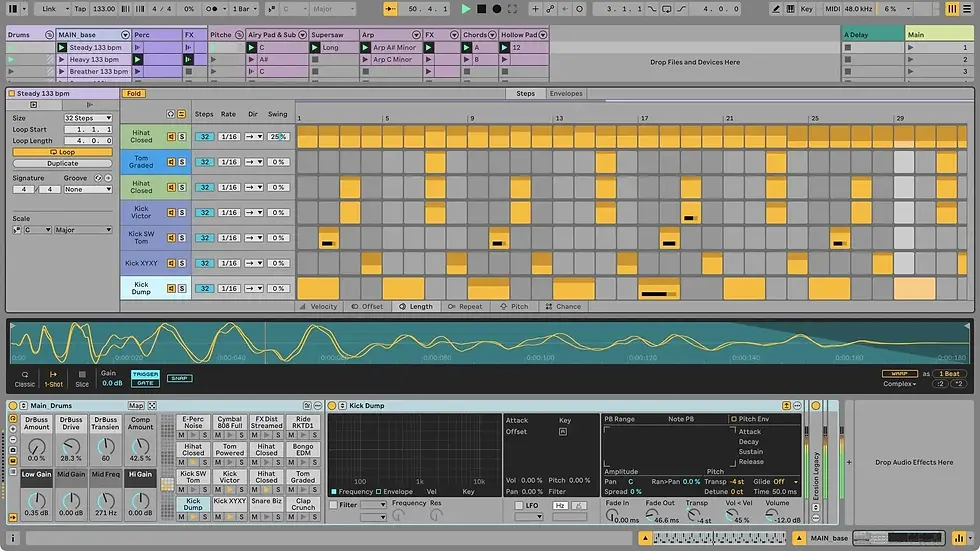
The new Step Sequencer creates MIDI beats and melodies from a grid. Each row can have its own length and playback settings, which lets short patterns overlap and form changing polyrhythms. Individual steps can also store velocity, chance, repeat and pitch bend values.
Capture Automation
Capture Automation keeps control movements after you make them. You can turn knobs, press buttons or move other controls while exploring, then press Capture to convert those gestures into editable automation. It is useful when a good parameter movement happens before you have prepared the track for automation recording.

Contextual Browsing
Contextual Browsing loads devices and swaps presets directly from the device chain. New clickable controls and keyboard shortcuts let you build Instrument Racks and effect chains without opening the main Browser. This keeps the current sound and the relevant choices in the same part of the interface.

Ableton says you can also use Contextual Browsing without moving the mouse. That should help when you already know which device or preset you need and want to keep working from the keyboard. It also cuts down the movement between the Browser and the device chain.

Follow sounds further
Live 13 adds new tools for percussion, sample looping and Rack control. Drum Synth covers modeled and drum-machine-style percussion, while Looplet turns one audio source into layered loops. Racks gain more Macros and mapping options, and Envelope Clips bring automation and modulation to Return track effects.
Drum Synth
Drum Synth is a percussion instrument with controls designed to stay useful across their full range. It can make classic drum-machine hits, physically modeled percussion and more experimental sounds between those approaches. The focused controls should suit producers who want to shape drum sounds directly instead of searching through samples.

Our 5 Easy Ways To Make Your Drums Sound Awesome video shows five drum-processing ideas in Live 12. It provides useful background for placing Live 13’s new Drum Synth sounds in a mix. The video remains relevant because it focuses on processing choices rather than the new instrument itself.
Looplet
Looplet is a Max for Live device included with Live 13 Suite. Four playheads loop and layer different parts of one sample, and you can also capture audio directly into the device. Ableton describes uses including ambient textures, tape-style gestures, granular glitches and drones.

Looplet is designed for loose, grid-free loops that remain playable. This makes it suited to material that should move without following a rigid repeated pattern. It is only included with Live 13 Suite, according to Ableton’s announcement.

Rack controls and mapping
Racks in Live 13 can use up to 32 Macros as remote controls or modulators. You can reorder Macros, give each mapping its own curve, add buttons for on/off controls and create mappings by dragging and dropping. These changes give larger Racks more controls while letting each mapped parameter respond in a different way.

Round Robin can cycle incoming notes through chains in Instrument Racks and MIDI Effect Racks. It does not apply to every type of Rack. This can distribute repeated notes between different instrument or MIDI-processing chains without manual switching.
Envelope Clips
Envelope Clips add automation or modulation to effects on Return tracks. A scene can hold different device settings, while looping clips can keep effect parameters moving over time. You can also combine Envelope Clips with Follow Actions and unlinked envelopes for changes that repeat less predictably.

Noise Harmony shows five ways to improve drum sounds in Live 12, providing useful context for Live 13’s new Drum Synth.
Also check
Bring the mix into focus
Live 13 adds tools for splitting a signal by frequency or stereo position, controlling peaks and shaping transients. The mixer also shows track devices more clearly and receives several smaller display and control changes. Suite users get two new dynamics effects and five Softube-made Max for Live processors.
Multiband and Mid-Side Racks
Multiband Racks apply different effects to separate frequency ranges, with several filter types including linear phase filters. Mid-Side Racks split the center of a stereo signal from its sides, so each part can receive different processing. These Racks can help balance competing sounds, control stereo width and make room for details in a dense Set.

Clipper and Transient Shaper
Clipper and Transient Shaper are two new audio effects included with Live 13 Suite. Transient Shaper can add punch, soften attacks and tighten or bring out the tails of sounds. It is aimed at detailed control over how quickly a sound hits and how its decay behaves.

Clipper controls peaks and can push a mix louder or add harmonic distortion. It gives Suite users another way to manage dynamics before or instead of other peak-control tools. Both effects appear directly in Live rather than requiring a separate plug-in.

New Core Library presets
The Core Library gains new effect presets, Racks and templates for vocal production, guitar production, mixing and mastering. They provide prepared starting points for common production jobs rather than requiring every chain to begin empty. Ableton has not limited these new Core Library additions to Suite in the announcement.
Device Slots and other Mixer improvements
Device Slots show the devices on each track directly inside the mixer. You can toggle devices, change their order and try different combinations without opening tracks one at a time. This gives you a quicker view of which processing is active across a larger Set.
The mixer also gets compact Send sliders, quicker control over which sections are visible and smoother resizing. These are smaller changes than the new effects, but they address routine mixer work. They should be useful when screen space is limited or a Set contains many tracks and sends.
Classic Dynamics & EQ Pack by Softube
The Classic Dynamics & EQ Pack by Softube contains five Max for Live audio effects for Live 13 Suite. Softube modeled them on sought-after studio hardware, covering FET and optical compression, British console EQ and compression, and analog-style drive. The devices are also prepared for hands-on control from Push.

What’s new for Push 3 in Ableton Live 13
Push 3 gains Custom Layouts, a Performance Mixer and a pad-based version of the new Step Sequencer. Device Mode also gets deeper access to Racks, routing and Live 13’s new processing tools. These features work with Push connected to Live or running standalone where stated by Ableton.
Custom Layouts
Custom Layouts let you arrange the Push 3 pad surface for each Set. A layout can combine note areas, Session View, faders and expressive XYZ controls, with those elements mapped to tracks and parameters. You could place an instrument beside clip launching and effect controls, or build a grid that changes several sounds at once.
Performance Mixer
Performance Mixer places Session View above touch-responsive pad faders. You can launch clips and scenes while controlling track levels and sends with both hands. Ableton designed it for DJ sets, dub-style improvisation and other performances that treat the mixer as a playable part of the Set.
New Step Sequencer on Push 3
The new Step Sequencer becomes a physical pad-based tool on Push 3. Each pitch row or Drum Rack pad can use its own sequence length and playback settings, allowing beats and melodies to overlap as polyrhythms. Expressive Step Editing changes velocity, chance, repeat and pitch bend on individual steps or across several pads.

Device Mode Upgrades
The upgraded Device Mode uses the jog wheel to move through devices, parameter banks and nested Rack chains. Push users can work with Drum Rack returns and pad routing, use up to 32 Rack Macros and use Macros as modulators. Live 13’s Multiband and Mid-Side Racks can also be controlled from the hardware.
Price and availability
Ableton Live 13 will be released in early 2027, and the public beta is available now. During the promotion, all Live 12 editions and upgrades from earlier versions are 20% off. Buying a Live 12 edition during this period includes a free upgrade to the corresponding Live 13 edition when it is released.
Ableton Live owners can sign in to check their upgrade price. Move, Push 3 and the Push Upgrade Kit are also 20% off through November 30, 2026. You can see the complete feature list on the official Ableton Live 13 page.
See What Is Coming in Live 13
The public beta is available now, and buying Live 12 during the promotion includes the corresponding Live 13 upgrade. Ableton’s page has the full feature overview and access to the beta.
More information
FOLLOW US ON


Comments