Best MIDI Keyboards for Small Home Studios Compared

22 hours ago
17 min read
The best MIDI keyboards for small home studios need to fit your desk without making every session feel cramped. Do you need full-size keys, drum pads and faders, or would a smaller controller leave more room for your computer keyboard and mouse? This comparison looks at five compact models and explains how their key size, controls, DAW support, connections and prices affect everyday use. We also compare their exact dimensions, so you can find the right balance before you buy.
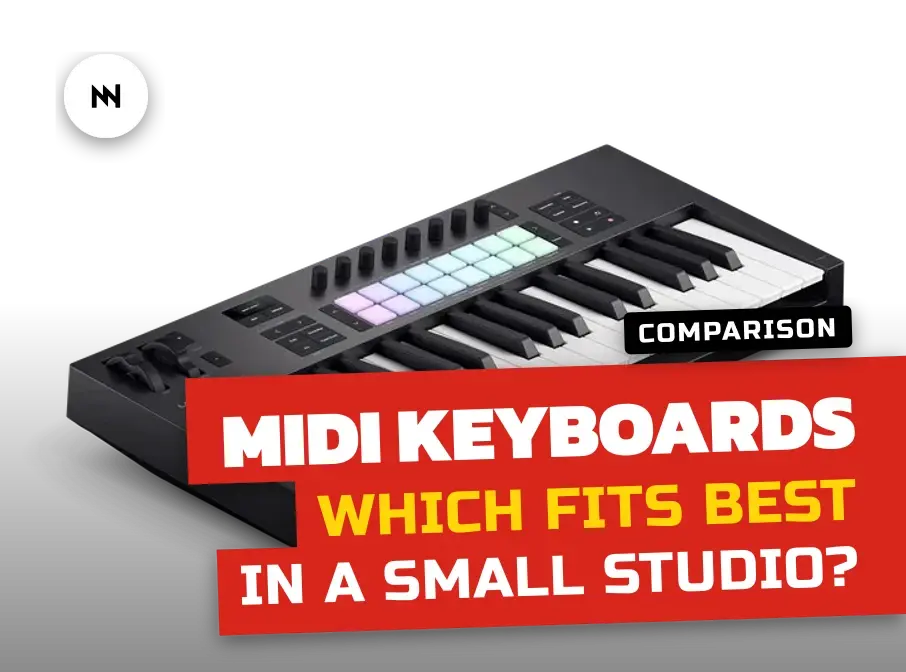
Note: This post contains affiliate links. If you choose to buy through them, I'll get a small kickback - at no extra cost to you. It helps me keep Noise Harmony going. Thank you!
Table of contents
Best MIDI keyboards for small home studios: quick picks
A MIDI keyboard sends performance and control data to software or external instruments, but it does not make sound by itself. You need a virtual instrument or hardware sound source, plus headphones or speakers to hear it. An audio interface is optional for basic MIDI use, although it can help with audio recording and low-latency monitoring.
The five controllers cover a useful range from 25 mini keys to 49 full-size keys. Their widths run from 347.5 mm to 790 mm, so the largest model needs more than twice the desk width of the smallest. Measure the open area in front of your monitor rather than relying on the word compact in a product description.
Novation Launchkey 37 MK4: best overall balance of key range, pads and DAW control
Akai Professional MPK Mini IV: best for the smallest desk and beatmaking
Arturia MiniLab 3: best compact Arturia controller with computer-based assignment editing
Arturia KeyLab Essential 49 mk3: best for four octaves and mixer-style control
M-Audio Oxygen Pro Mini: best compact choice with physical faders
Best full-size compact option: Novation Launchkey 37 MK4
Best hardware connection: Akai MPK Mini IV, Arturia MiniLab 3, Launchkey 37 MK4 or KeyLab Essential 49 mk3 with full-size five-pin MIDI out
Novation Launchkey 37 MK4: the best overall choice
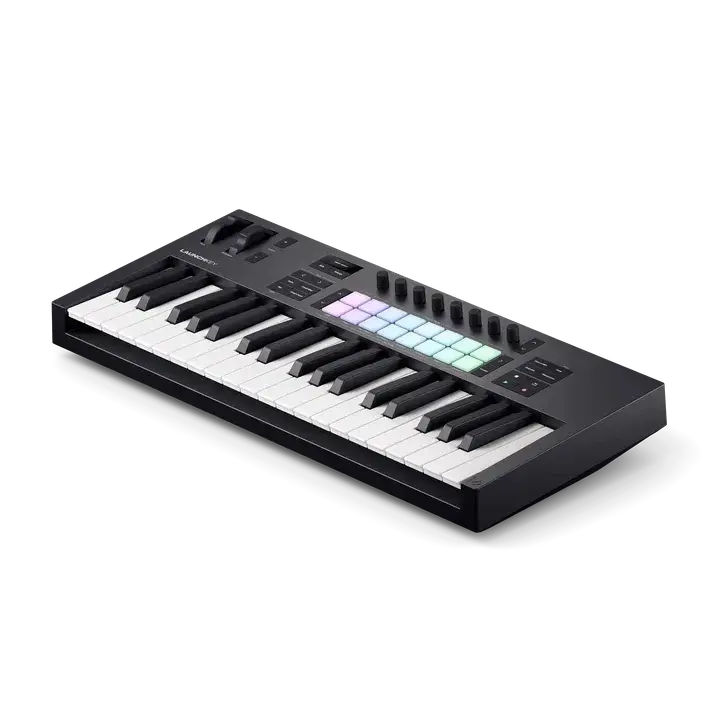
The Novation Launchkey 37 MK4 offers the most useful middle ground in this group. Its 37 full-size synth-action keys leave enough range for bass lines, melodies and one-handed chords without constant octave changes. At 557 × 251 mm, it still fits desks where a 49-key controller would crowd the computer keyboard and mouse.
Its control surface has eight endless encoders and 16 RGB FSR pads. The pads are velocity-sensitive and support polyphonic aftertouch, which means pressure can affect each held pad separately when the instrument supports it. The keys do not transmit aftertouch, so this expression comes from the pads rather than the keyboard.
Launchkey includes a generative arpeggiator with a step editor, 30 scales and Chord Map, Fixed Chord and User Chord modes. Four custom pad modes and four custom encoder modes can be stored on the controller, while Novation Components handles editing and firmware updates. The 37-key version does not have the Split and Layer functions found on the larger 49-, 61- and 88-key models.
Dedicated integration covers Ableton Live, Logic Pro, Cubase, FL Studio, Reason, Bitwig and Ardour, with HUI available for other compatible hosts. Ableton Live detects the controller automatically from Live 11.3.26 or Live 12.0.25 onward. At the time of writing, it is €195 at Thomann, making it the most expensive controller here despite lacking faders.
Novation's Launchkey 37 MK4 product page gives you a closer look at the controller. It is useful for judging whether the wider control surface makes sense for your desk before ordering.
Keys: 37 full-size, velocity-sensitive synth-action keys
Controls: 16 RGB pads and eight endless encoders
Aftertouch: none on keys; polyphonic aftertouch on pads
Connections: USB-C, five-pin MIDI out and sustain input
Size and weight: 557 × 251 × 79 mm, 2.18 kg
Novation demonstrates the Launchkey 37 MK4 keyboard, pads, chord tools and DAW controls.
Akai Professional MPK Mini IV: the smallest desk footprint

The Akai Professional MPK Mini IV is the easiest model to place on a narrow desk. Its 347.5 × 192 mm base covers about 667 cm², while the 25 mini keys keep the width below 35 cm. It suits beatmaking, bass lines and short melodies better than two-handed keyboard parts.
The fourth generation adds mechanical pitch and modulation wheels, a color display, more transport controls, USB-C and a full-size five-pin MIDI output. Eight RGB MPC pads are velocity- and pressure-sensitive, with two banks for additional assignments. The redesigned keybed is velocity-sensitive but does not have aftertouch.
Scale and Chord modes help when the small range becomes restrictive, while the arpeggiator offers seven play modes plus Pattern, Arp Freeze and Mutate. The pads can add accents, ties and ratchets to arpeggiator patterns. There are 13 preset slots, including 11 editable user presets, but all editing happens on the hardware because Akai does not supply a separate editor.
Official mappings cover Ableton Live, Logic Pro, GarageBand, FL Studio and Cubase. Akai's current FL Studio instructions require firmware v1.38 or later and FL Studio 2024 or later, so update through inMusic Software Center before setting up the control script. The included software comprises Ableton Live Lite 12 and a Studio Instrument Collection with more than 1,000 sounds in standalone, VST3 and AU formats, but not AAX.
At the time of writing, the black version costs €99 at Thomann. Akai's official video is titled Your Next Big Idea Starts with MPK Mini.
Keys: 25 velocity-sensitive mini keys
Controls: eight pressure-sensitive RGB pads and eight 360-degree knobs
Aftertouch: none on keys; pressure sensitivity on pads
Connections: USB-C, five-pin MIDI out and sustain input
Size and weight: 347.5 × 192 × 45.7 mm, 1.05 kg
Using separate MIDI channels for keys and pads
The keys and pads can address separate instruments from one preset. Open the Global Menu with `SHIFT + LOOP`, set `MidiCh` for the keys and `PadCh` for the pads, then save the setup with `SHIFT + OCT +`. This lets the keyboard play a bass instrument while the pads trigger drums on another channel.
Routing the five-pin MIDI output
Open `Globals > DINsrc` when connecting the MPK Mini IV to external hardware. Choose `INT` to send the controller's own data through the MIDI output, or `USB` to pass MIDI from the computer. That full-size socket is useful if you want a compact controller that can sit between a DAW and a hardware synth.
Akai shows the MPK Mini IV's updated wheels, screen, pads and creative modes.
Arturia MiniLab 3: compact control with a convenient editor

The Arturia MiniLab 3 is a strong alternative to the Akai when you want a small controller with faders and computer-based assignment editing. Its 25 velocity-sensitive slim keys sit in a 356 × 219 mm body, giving it a footprint of about 780 cm². It is slightly wider and deeper than the MPK Mini IV, but still easy to fit in front of a laptop or monitor.
The top panel has eight rotary encoders, four faders and eight RGB pads with velocity and pressure sensitivity. Pitch bend and modulation use capacitive touch strips rather than mechanical wheels. A small display and clickable browser knob give you feedback while browsing presets or changing settings.
Chord mode, Hold and the built-in arpeggiator cover the main creative tools expected from a compact controller. MiniLab 3 also stores up to five user presets and provides a DAW preset for automatic integration with major DAWs. Arturia publishes dedicated scripts for Ableton Live, Logic Pro, Cubase, FL Studio, Reason and Bitwig Studio.
I own the MiniLab 3, and its MIDI Control Center is one of the reasons I like it. The app makes editing controller assignments convenient from the computer, rather than forcing every change through a small hardware screen. Arturia also uses the app for firmware updates, and its resources page currently lists MiniLab 3 firmware 1.2.0.
USB-C handles power and connection to a computer or iPad. A full-size five-pin MIDI output can control external instruments, while the configurable pedal input accepts sustain, expression or footswitch control. At the time of writing, the white version costs €89 at Thomann.
Keys: 25 velocity-sensitive slim keys
Controls: eight pressure-sensitive RGB pads, eight encoders and four faders
Aftertouch: none on keys; pressure sensitivity on pads
Connections: USB-C, five-pin MIDI out and configurable pedal input
Size and weight: 356 × 219 × 54 mm, 1 kg
Arturia's own launch video for the MiniLab 3: pads, touch strips, encoders and faders.
Arturia KeyLab Essential 49 mk3 and Arturia KeyStep mk2

The Arturia KeyLab Essential 49 mk3 is the best choice here for two-handed parts and mixer control. Its 49 full-size velocity-sensitive keys have a hybrid synth-piano feel, giving you four octaves before touching the octave buttons. The trade-off is a 790 mm width and the largest footprint in this comparison.
Nine 30 mm faders and nine rotary encoders give the KeyLab a conventional channel-strip layout. It also has eight touch- and pressure-sensitive pads, a clickable navigation encoder and a 2.5-inch screen. The keys do not support aftertouch, and Arturia does not describe the pads as having polyphonic aftertouch.
The creative functions include an arpeggiator, Chord mode, Scale mode, Hold and semitone transpose. Six user presets can store custom assignments. Arturia also gives the pedal input more flexibility than the other controllers by allowing sustain, expression or footswitch use.
Dedicated scripts cover Ableton Live, Logic Pro, Cubase, FL Studio and Bitwig Studio, with MCU and HUI available for other hosts. FL Studio 21 and later should detect the controller after you select its DAW program. Firmware 1.2.1, dated August 27, 2025, is the current version listed on Arturia's resources page. The black model costs €179 at Thomann at the time of writing.
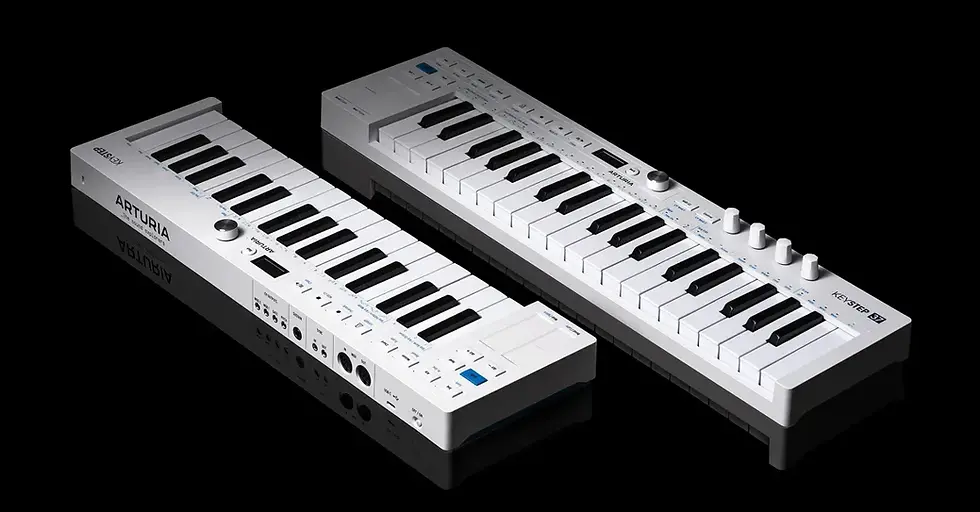
The Arturia KeyStep mk2 is worth considering when hardware sequencing and synth connections matter more than mixer control. It has 32 velocity- and aftertouch-sensitive Slimkeys, a polyphonic sequencer with up to 64 steps, a 16-mode arpeggiator, MIDI DIN, USB-C and CV/Gate connections. When we visited Superbooth 2026, KeyStep controllers seemed to be on almost every stand, often sitting in front of desktop and modular gear. That does not make the KeyStep the best DAW controller in this comparison, but it helps explain why the range is so common in compact hardware setups.
Keys: 49 full-size velocity-sensitive keys
Controls: eight pressure-sensitive pads, nine encoders and nine faders
Aftertouch: none on keys; pressure sensitivity on pads
Connections: USB-C, five-pin MIDI out and configurable pedal input
Size and weight: 790 × 240 × 70 mm, 2.76 kg
Setting it up in Ableton Live
In Ableton Live 11.3.3 or later, open `Options/Preferences > Link Tempo MIDI` and select `KeyLab Essential mk3` as the Control Surface. Assign the `KL Essential xx mk3 MIDI` input and output, while leaving the DIN THRU, MCU/HUI and ALV ports disabled. Press `Prog` on the keyboard until the `DAW` program appears; the `Save` button then works as Ableton's Capture MIDI command.
Arturia's own launch video for the KeyLab Essential mk3: the screen, faders, pads and DAW control.
Also check
M-Audio Oxygen Pro Mini: the most controls in a small space

The M-Audio Oxygen Pro Mini fits 32 mini keys, four faders and four knobs into a chassis only 401 mm wide. Its footprint is about 762 cm², which is only 95 cm² larger than the Akai. This is the compact option for producers who want physical mixer controls without moving up to a 49-key controller.
The semi-weighted PrecisionTouch mini keys offer seven more notes than a standard 25-key layout. Eight RGB pads handle drum input, while assignable buttons, transport controls and physical pitch and modulation wheels cover common DAW jobs. Neither the keys nor the pads are specified with aftertouch.
Smart Chord can generate major, minor or user-defined chord structures from one key or pad, and Smart Scale has 16 scale variations. Note Repeat can work momentarily or stay latched. The arpeggiator includes Type, Octave, Gate and Swing controls.
M-Audio provides mapped DAW operation for Ableton Live, Pro Tools, MPC Beats, Cubase, Logic and Studio One. Press `DAW`, choose the host on the controller and select the matching controller configuration in the software. Official mappings cover transport, track selection, pan, faders, mute, solo and record-arm functions.
The Oxygen Pro Mini costs €92 at Thomann at the time of writing. Its listed firmware is 2.15, although M-Audio's Mac compatibility labels only run through macOS 11, so owners of newer systems should confirm installer support first.
Keys: 32 semi-weighted velocity-sensitive mini keys
Controls: eight RGB pads, four knobs and four faders
Aftertouch: none specified on keys or pads
Connections: USB-MIDI, 3.5 mm MIDI out and sustain input
Size and weight: 401 × 190 × 60 mm, 1.2 kg
M-Audio shows how the Oxygen Pro Mini combines mini keys, pads, knobs and faders.
How to compare key size, feel and controls
25, 32, 37 or 49 keys: what fits your music?
A 25-key controller is enough for bass lines, leads, drum programming and simple one-handed chords. It becomes restrictive when a chord voicing and melody need different registers, because you must keep reaching for the octave buttons. The MPK Mini IV works best when minimum width matters more than uninterrupted keyboard range. The MiniLab 3 uses the same 25-key range but adds four faders and editing through MIDI Control Center.
A 32-key layout adds a little breathing room without taking over the desk. The Oxygen Pro Mini can cover wider melodies and chord shapes than a 25-key model, although it still uses mini keys. It remains a compact production controller rather than a replacement for a piano-style keyboard.
Thirty-seven full-size keys are the best middle ground for many producers. The Launchkey gives your hands normal key spacing and enough range for most synth, bass and chord parts. Two-handed piano parts can still cross the edge of the keyboard, but octave switching is less frequent than on the Akai, Arturia MiniLab or M-Audio.
Forty-nine keys make two-handed chord parts, wider voicings and keyswitch-heavy sample instruments easier. A keyswitch changes articulations in an instrument, so it can occupy notes below the playable range. The KeyLab Essential 49 leaves more room for those control notes, but its 790 mm chassis may force the computer keyboard onto another shelf.
Mini keys and full-size keys change how you play
Mini keys save width, but the smaller spacing changes familiar chord shapes. They work well for programmed music, travel and short parts, especially when portability matters more than piano technique. Players with larger hands or years of full-size keyboard practice may need time to adjust.
Full-size keys give your fingers the spacing found on most synthesizers and pianos. The Launchkey uses synth action, which normally favors quick synth and organ parts, while the KeyLab has a hybrid synth-piano feel. Neither is a hammer-action piano keyboard, and neither should be bought as a substitute for a weighted 88-key instrument.
The Oxygen Pro Mini is unusual here because its mini keys are described as semi-weighted. That can give them more resistance than basic mini keys, but key size still limits the playing area. The MPK Mini IV uses Akai's redesigned third-generation mini keybed, while the MiniLab 3 uses Arturia's velocity-sensitive slim keys. None of these three compact keybeds has keyboard aftertouch.
Key feel is personal, so try the models in person when possible. Play repeated notes near the back and front of each key, quiet chords and quick octave runs. The right action is the one that lets you control velocity without making your hands fight the controller.
Pads, faders, encoders and aftertouch explained
Pads matter most when you record drums or want an alternative way to launch notes and chords. Launchkey has 16 pads, while each rival has eight. The extra row reduces bank switching, but eight pads can be enough if your drum parts use kick, snare, hats and a few percussion sounds.
Encoders help with plugin parameters because they can control filters, envelopes and effect settings without dragging a mouse. Launchkey's eight endless encoders are useful when moving between devices because they do not have a fixed physical endpoint. Akai and MiniLab 3 each supply eight assignable knobs, while the KeyLab Essential and Oxygen Pro Mini add their own combinations of knobs and faders.
Faders are most useful when several track levels need changes at once. The KeyLab provides nine, making it the clearest mixer-style option, while the MiniLab 3 and Oxygen Pro Mini provide four in much less space. If you automate one parameter occasionally, the mouse may be faster and a simpler controller may be the better buy.
Key aftertouch and pad pressure are not the same feature. None of these five keyboards transmits aftertouch from its keys. Launchkey offers polyphonic aftertouch from its pads, Akai, MiniLab 3 and KeyLab Essential specify pressure-sensitive pads, and M-Audio only specifies velocity sensitivity for its pads. Our explainer on MIDI Polyphonic Expression covers per-note control more broadly.
DAW integration, desk setup and connections

DAW integration decides how much setup is needed before transport, track selection and device control work. A named script usually gives deeper control than a generic MIDI mapping. MCU and HUI can provide mixer and transport functions in compatible hosts, but they do not guarantee the same device feedback as a dedicated script.
Novation covers the widest list in the official documentation, while Akai concentrates on five major music-making applications. Arturia provides dedicated scripts for MiniLab 3 and KeyLab Essential 49 mk3 across several major DAWs, with additional generic control options. M-Audio is the only choice here whose named mapped-host list includes both Studio One and Pro Tools.
Reaper is not named as a dedicated integration target for these five controllers in the supplied official sources. Basic keys, pads, wheels and MIDI CC controls can still send standard MIDI data, but deeper functions may require manual assignments or a compatible generic control method. Our explainer on what MIDI is and what it is used for covers the difference between note data and DAW control.
Ableton Live: dedicated support from all five controllers
Logic Pro: dedicated support from all five controllers
FL Studio: dedicated support from Novation, Akai, MiniLab 3 and KeyLab Essential 49 mk3; M-Audio does not name it in the supplied mapped-host list
Cubase: dedicated support from all five controllers
Bitwig Studio: dedicated support from Novation, MiniLab 3 and KeyLab Essential 49 mk3; Akai and M-Audio do not name Bitwig in their published support lists
Studio One: named mapped support from M-Audio; MiniLab 3 offers MCU transport control, while the others require a compatible generic method or manual mapping unless their current software says otherwise
Pro Tools: named mapped support from M-Audio; KeyLab Essential 49 mk3 offers generic MCU/HUI options, MiniLab 3 offers MCU transport control and Novation offers HUI for compatible hosts
Reaper: no dedicated script named in the supplied official documentation; plan for manual setup
Measure width, depth and rear cable clearance
Update firmware before configuring the DAW
Choose the maker's control-surface script
Check notes, velocity, transport and mixer control
Save a user preset or DAW template
Test the MIDI output and channel with external gear
Desk setup and first-session checklist
Measure the clear width and depth where the controller will sit, including any space beneath the monitor. Leave room behind it so USB, MIDI and pedal cables do not bend against a wall. The footprint calculation does not include plugs, rear cable clearance or a computer keyboard placed in front.

Install the maker's firmware or configuration tool before building DAW templates. Akai uses inMusic Software Center, Novation uses Components, and Arturia uses MIDI Control Center for MiniLab 3 while publishing KeyLab firmware and integration scripts on its resources pages. M-Audio provides firmware and preset-editor downloads for Windows and macOS, though its published Mac compatibility information is old.
In the DAW, select the correct control surface and enable the controller's MIDI input. Load an instrument, check notes and velocity, then test transport, pads, encoders and faders. Map one control manually and save the result as a project template or hardware user preset where supported.
External instruments need a separate check. The Akai, Novation, MiniLab 3 and KeyLab Essential have full-size five-pin MIDI outputs, while the M-Audio uses a smaller MIDI output identified as a 3.5 mm jack. Confirm the cable type and MIDI channel before assuming a hardware synth is failing to receive notes.
Which MIDI keyboard should you buy?

Choose the Novation Launchkey 37 MK4 if your desk has at least 557 mm of clear width and you want full-size keys, expressive pads and strong support across several DAWs. It is the most balanced controller here, although producers who mix with faders will need another surface or the mouse.
Choose the MPK Mini IV when every centimeter matters, especially for beats, short synth parts and a setup that may move between rooms. Choose the MiniLab 3 when you want a compact Arturia controller with four faders and convenient computer-based assignment editing. Choose the Oxygen Pro Mini when you want compact faders and 32 keys for less money. Choose the KeyLab Essential 49 mk3 when two-handed playing and nine-channel mixer control matter more than keeping the desk clear.
A simple decision starts with width. Below 350 mm, the Akai is the practical answer; around 356 mm, the MiniLab 3 adds faders and MIDI Control Center; around 400 mm, the M-Audio adds keys; at 557 mm, the Launchkey is the best all-round step up; and at 790 mm, the KeyLab gives you four octaves. After that, use your DAW and need for pads or faders as the tie-breakers.
Several alternatives may suit different priorities. For another Arturia option, see our news on the Arturia MiniLab 37. The Launchkey 49 MK4 is the logical step up if you need the Split and Layer functions missing from the 37-key model. Our news on the Akai MPK Mini Plus II covers another 37-key controller. Polyend Keys takes a different approach by putting MIDI control inside a mechanical QWERTY keyboard.
You do not need to replace a working controller because a new model has more pads. Keep the one you have if its key range, MIDI connection and DAW mapping already cover your sessions. A simpler key-only controller also makes sense when you enter drums with a mouse and rarely record automation from physical controls.
The Launchkey 37 MK4 is the best fit for most small studios
The Launchkey 37 MK4 earns the overall recommendation because it avoids the largest compromises at either end of this comparison. Its full-size keys offer more comfortable playing than the mini controllers, while its footprint remains much smaller than the KeyLab Essential 49 mk3. The 16 pads and broad DAW support also give it room to handle beats, instruments and plugin control.
The other four models make more sense when one need takes priority. Buy the Akai for minimum size, the MiniLab 3 for compact Arturia control and convenient editing, the M-Audio for inexpensive faders or the KeyLab Essential for four-octave parts and mixer control. Measure the desk first, then choose the fewest controls and keys that still cover the way you make music.
Make Room for the Best All-Rounder
The Launchkey 37 MK4 gives you full-size keys and expressive pads without moving to a wide 49-key controller. Check the current Thomann listing after measuring 557 × 251 mm on your desk.
More information
Frequently Asked Questions
Are mini keys good enough for serious music production?
Yes, mini keys are suitable for serious production when you mainly record short synth parts, bass lines, chords and drums. Full-size keys are usually more comfortable for trained keyboard players, larger hands and parts that need precise two-handed technique.
What is the best compact MIDI keyboard with full-size keys?
The Novation Launchkey 37 MK4 is the best compact full-size option in this comparison. It combines 37 synth-action keys with 16 pads, eight endless encoders and dedicated support for several major DAWs.
Is a 25-key MIDI controller enough for chords and two-handed playing?
It is enough for one-handed chords, but it is restrictive for most two-handed parts. You can change octaves, use Chord mode or record each hand separately, but 37 or 49 keys will make wider parts easier.
Which small MIDI keyboard has the best Ableton Live integration?
The Launchkey 37 MK4 offers dedicated Ableton Live integration, Capture MIDI and Session controls. All five controllers support Ableton Live, but their available controls and required setup differ.
Which controller is best for FL Studio?
The Launchkey 37 MK4, MPK Mini IV, MiniLab 3 and KeyLab Essential 49 mk3 all have official FL Studio support. The Akai requires FL Studio 2024 and firmware v1.38 or later for its current published setup, while Arturia specifies FL Studio 21 or later for the KeyLab Essential.
Do these MIDI keyboards have aftertouch?
None of the five has aftertouch on its keyboard. The Launchkey has polyphonic aftertouch on its pads, Akai and both Arturia controllers specify pressure-sensitive pads, and M-Audio only specifies velocity sensitivity for the Oxygen Pro Mini pads.
Does a MIDI keyboard make sound or need an audio interface?
No, these MIDI keyboards do not make sound. They control a software instrument or an external hardware sound source, and an audio interface is optional unless you need audio inputs or lower-latency monitoring.
Can these compact controllers control hardware synths?
Yes. All five have a MIDI output, although the Akai, Novation and both Arturia controllers use full-size five-pin sockets while the M-Audio output is a smaller jack. The hardware synth still needs the correct cable, MIDI channel and its own audio connection.
FOLLOW US ON


Comments