HX Stomp Preset Packs Worth Buying: How to Choose

23 minutes ago
11 min read
A bought HX Stomp preset can look perfect on the product page and still sound thin, clip your input or refuse to load on an older pedal. I think the useful question is how much setup work the pack removes once it reaches your own rig. This guide explains how to find HX Stomp preset packs worth buying, including the DSP and block limits, speaker and amp setup, installation, quick adjustments and firmware support. It also covers when you will learn more by building the sound yourself.

Note: This post contains affiliate links. If you choose to buy through them, I'll get a small kickback - at no extra cost to you. It helps me keep Noise Harmony going. Thank you!
Table of contents
How to tell which HX Stomp preset packs are worth buying
A worthwhile pack should solve a clear problem in your rig and state exactly what it needs. Look for the number of presets, required firmware, snapshot support and whether the sounds were built specifically for HX Stomp. The page should also explain if the pack uses stock cabs or needs separate IR files.
Audio previews help you judge the style, but they cannot tell you how the presets will react to your guitar. Different pickups, input settings and speakers change the result. Treat the demo as a picture of the intended sound rather than a promise that your rig will match it without adjustment.
Clear instructions matter almost as much as the sounds. A useful pack tells you how to import its files, where any IRs belong and what type of output it expects. If those details are missing, allow time for troubleshooting before rehearsal rather than assuming the Stomp is at fault.
Built specifically for HX Stomp
Required firmware and HX Edit version stated
Preset and snapshot counts listed
Stock cab or required IR information included
Audio examples for the intended style
Basic setup and adjustment instructions
Why can the stock HX Stomp presets sound thin?

Stock HX Stomp presets can sound thin when the preset and playback system are working toward different goals. A sound prepared for a full mix may feel lean when you play it alone. A preset intended for headphones or a PA will also behave differently through the front of a guitar amp.
Cab choice is another common cause, although a separate IR is not automatically better. Line 6 says its cab models are equivalent to a 2048-point IR, and HX Stomp can load third-party IR files. What matters is whether the cab or IR suits your output, guitar and pickups.
Before replacing every factory sound, check the basic signal chain and input setting. Line 6’s HX Stomp Out of the Box video shows the first connections and setup. It is a useful check when every preset seems wrong in the same way.
Line 6 shows the basic HX Stomp connections and first setup before you start judging or replacing presets.
When are paid HX Stomp presets worth it?
Paid presets make sense when they save you more setup time than they cost. A good pack gives you complete signal chains, useful snapshot changes and sounds that serve a clear part of your set. This is especially helpful when you need several related sounds without stopping to rebuild a delay or rebalance every level.
Building your own presets is the better choice when programming the Stomp is part of what you enjoy. You learn how amp gain, cab choice, delay feedback and output level affect each other. That knowledge becomes useful when the DSP meter fills up just as you reach for one more pitch or reverb block.
A bought preset can still teach you something. Open it in HX Edit, bypass the blocks one at a time and listen to what each one contributes. For me, a pack earns its price when it provides a usable starting sound and leaves enough room for sensible changes to fit your guitar.
What must fit into one DSP and eight blocks?

Every HX Stomp preset must fit into one DSP and no more than eight blocks. Firmware 3.0 raised the old six-block limit to eight, but it did not add more processing power. Some combinations can therefore run out of DSP before all eight positions are filled.
The block count includes the amp, cab or IR and every effect in the chain. Demanding poly pitch models can use a large part of the available processing power, so a pack should avoid filling slots that the Stomp cannot run together. I would rather see six useful blocks with room for adjustment than eight blocks that leave no space for the player’s own needs.
Presets made for Helix Floor or LT should not be treated as automatic HX Stomp presets. The larger units can support processing and routing that the smaller pedal cannot reproduce. A proper Stomp version should be checked against its own DSP, block and path limits.
Snapshots add different sounds without loading another preset and causing an audio gap. The Stomp XL gives you more physical switches, but it shares the same eight-block limit and DSP class. Line 6’s HX Stomp Controllers & Snapshots video shows how controllers and snapshots make one compact preset more useful.
One DSP for the complete signal chain
Eight blocks at most, subject to available DSP
Enough processing room for every included block
Useful snapshot changes
Clear footswitch and controller assignments
A version built for HX Stomp or HX Stomp XL
Line 6 explains how controllers and snapshots turn one HX Stomp preset into several playable sounds.
Also check
What is in our Noise Harmony HX Stomp packs?

Our HX Stomp range has two individual packs and one bundle. Aura covers delay and modulation, while Reflections focuses on reverb-based sounds. The Aura & Reflections Bundle combines both sets.
Line 6 HX Stomp | 12 Delay/Mod Presets | "Aura"
€22.99€11.49
Buy Now
Line 6 HX Stomp | 12 Reverb Presets | "Reflections"
€22.99€11.49
Buy Now
Aura for delay and modulation
Our Aura pack contains 12 delay and modulation presets with 35+ snapshots. It is aimed at ambient parts, cinematic textures, worship guitar and solos where the repeats and movement form an important part of the sound. The snapshots provide related variations without making you load another preset.
Aura makes the most sense when your amp and basic reverb needs are already covered, but delay and modulation take too long to set up. Its product page includes audio previews that show the general direction. Your guitar and playback system will still affect the gain, brightness and effect balance.
Reflections for reverb-based sounds
Our Reflections pack contains 12 reverb presets with 36 snapshots. It suits spacious clean parts, ambient guitar and players who want the reverb prepared inside a complete signal chain. The chains also show how the reverb sits around the amp and cab rather than presenting the effect by itself.
Reflections is the more focused choice when delay and modulation are already handled elsewhere. Check the product page for the current requirements before importing it. You should still match its input, amp gain and output level to your own guitar.
The bundle combines both sets
Our Aura & Reflections Bundle contains 24 presets and 70+ snapshots. At the time of writing, it costs €16.09 in our store. It suits players who need both effect groups and would otherwise buy the two individual packs.
The bundle saves money only when you will use both collections. Choose one individual pack when your rig already covers the other effect type. More preset files do not help when half of them never leave the computer.
How should a preset match your speakers, PA or guitar amp?

A complete HX Stomp preset usually makes the most sense through headphones, a PA or a full-range powered speaker. Keep the amp and cab blocks active in that setup because they create the modeled guitar rig. Switching off the cab will often make a direct sound harsh and unfinished.
If you connect the Stomp to a flat power amp and a real guitar cabinet, try bypassing the cab or IR block. A real speaker already shapes the high end and low end, so adding a modeled cab can make the result dark or muffled. Compare both settings at the volume you normally use.
Running a complete amp-and-cab preset into the front of a guitar amp adds the real preamp and speaker to the modeled chain. You may need to bypass the preset’s amp, cab or both, depending on what you want the Stomp to provide. There is no single switch position that fits every amp, so change one block at a time and keep the version that sounds balanced.
Pickups affect the input before any preset block gets involved. Match the HX Stomp input setting to the connected guitar, then adjust the amp gain if a hot humbucker distorts too early or a quieter single coil feels weak. Do this before changing several EQ bands, because the wrong input or gain setting can make the entire preset seem poorly voiced.
How to install HX Stomp presets with HX Edit
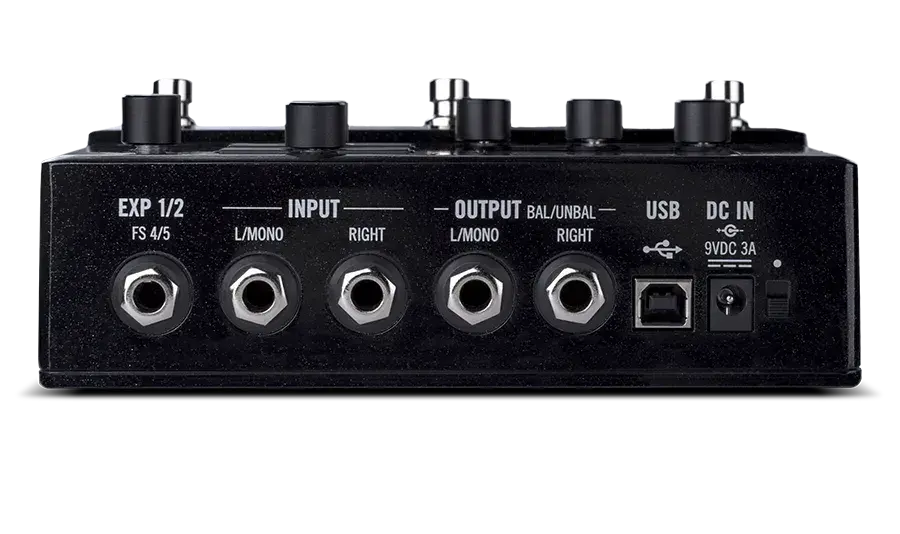
Install bought presets through HX Edit after backing up the pedal and checking its firmware. As of November 23, 2026, firmware 3.80 remains the newest official HX Stomp release listed by Line 6. Its update process requires HX Edit 3.82.
Connect HX Stomp to your computer over USB and create a full backup in HX Edit. Update the pedal if the pack needs a newer firmware, then drag the supplied .hlx files onto empty positions in the preset list. Wait for the transfer to finish before disconnecting the USB cable.
If the pack includes separate IR files, open the IR area in HX Edit and load the supplied .wav files. A preset can point to an IR block without carrying the audio file inside it. Follow the pack’s slot instructions so the preset loads the correct cabinet sound.
Line 6’s Updating HX Stomp video walks through the official update process. Watch it before importing presets if your pedal has been sitting on older firmware or has not been backed up recently.
Install the required HX Edit version
Back up the pedal before updating
Install the official firmware required by the pack
Drag the .hlx files into empty preset positions
Load supplied IR files only when the pack includes them
Check the amp, cab and IR blocks after importing
Line 6 walks through the official HX Stomp update process before you import new presets.
Hear it: “Reflections” for HX Stomp
Three sounds from our “Reflections” presets for the HX Stomp. Have a listen before you start turning knobs.
Distant AuraNoise Harmony · Reflections
NovaNoise Harmony · Reflections
Velvet ShimmerNoise Harmony · Reflections
How to adjust a bought preset in five minutes
Start with the input setting and the equipment connected to the output. Check that loud pickups do not cause unwanted clipping and that quieter pickups do not feel weak. Leave the detailed EQ alone until the basic level is right.
Listen through the speaker, PA, headphones or amp you will actually use. Keep the cab active for a direct full-range setup and reconsider it when a real guitar cabinet provides the speaker sound. Set the listening level with the hardware output control, then use the preset’s Output block for stored level changes.
Adjust the amp gain for your guitar before changing several tone controls. A hot bridge humbucker may need less gain than the guitar used in the preview, while a lower-output single coil may need more. Small changes preserve the balance between the amp, delay and reverb blocks.
Finally, compare every snapshot at rehearsal volume. Effect-heavy sounds can seem quieter even when the meter shows a similar level, so match them by ear in the setup where you will play. Save a new copy before making large changes, which gives you an easy route back to the supplied version.
How should you choose an HX Stomp preset pack?
Choose a pack that solves a specific sound or setup problem and clearly states its firmware, block, DSP and IR requirements. Listen to the previews, but also check whether the complete chain suits a PA, headphones, a real cabinet or the front of an amp. A smaller pack made for the Stomp can be more useful than a large collection adapted from a bigger Helix unit.
Buy when the pack saves time, gives you useful snapshots and leaves enough room for your own adjustments. Build the preset yourself when learning the chain matters more than getting a finished sound quickly, or when your rig needs routing that no general pack can predict. Both approaches are valid, and opening a bought preset block by block can connect them.
For me, the best packs are the ones that remain understandable after the first good sound. You should know what to bypass, where to adjust the gain and how to recover the files after an update. Do you normally buy HX Stomp presets or build every chain yourself? Let me know in the comments.
See our Aura and Reflections bundle
Our HX Stomp bundle contains 24 delay, modulation and reverb presets with more than 70 snapshots. It is the practical option when you need both collections rather than one effect group.
More information
Frequently Asked Questions
Are paid HX Stomp presets worth it, or should I build my own?
Paid presets are worth it when they save setup time, provide useful snapshots and fit the HX Stomp’s DSP limits. Build your own when programming is part of the fun or your rig needs a very specific signal chain.
Why do HX Stomp presets sound thin through my setup?
The preset may have been prepared for a different output or guitar. Check the input setting, amp and cab blocks, pickups and playback system before replacing the preset or making large EQ changes.
Do Helix Floor and LT presets work on HX Stomp?
Some simple presets may fit, but compatibility should not be assumed. HX Stomp has one DSP and a maximum of eight blocks, so a larger Helix preset may exceed its processing or routing limits.
What does error 8701, DSP block constraint exceeded, mean?
It means the preset asks for a block layout or processing load that HX Stomp cannot provide. Remove or replace a demanding block, or use a version made specifically for the Stomp.
Do HX Stomp presets work on HX Stomp XL?
Many packs support both models, but check the product page before buying. HX Stomp XL has more physical footswitches, while both units share the eight-block ceiling and the same DSP class.
How do I install HX Stomp presets and IRs?
Connect the pedal over USB, back it up and use HX Edit to place the .hlx files in empty preset positions. If the pack supplies IRs, load their .wav files in the stated slots before checking the preset.
Why does a bought preset sound different from its demo?
Your pickups, input setting, playback system and listening volume change the result. Match the input and cab arrangement first, then adjust amp gain and the Output block before reaching for detailed EQ.
ABOUT THE AUTHOR

Rafał
Sound designer, guitar tone, mixing and mastering
Rafał is the guitar tone person at Noise Harmony, from amps and effects to production, mixing and mastering. Plugins and the technical side of sound are his life. Over the years he has worked with Arturia, KORG, Xfer Records (Serum 2) and plenty of others, and he still plays in his bands whenever he can. Music isn't a job for him, it's everything.
FOLLOW US ON


Comments