M-VAVE FM-1 Firmware: Stock V16 vs FM1 Open V14

9 minutes ago
7 min read
M-VAVE FM-1 firmware now comes in two official versions: stock V16 and FM1 Open V14. The numbers make Open look older, but they are two different systems that do different jobs. Here is what each one gives you, who it suits and how to update or switch without losing your sounds.

Table of contents
Why V16 and Open V14 are not the same update
Stock V16 and FM1 Open V14 are two separate firmware lines, so you can't compare their numbers. Stock V16 is the normal FM-1 system, the one the synth ships with, and it just got a big update. FM1 Open is M-VAVE's own side project, with its own releases and its own way of working. A higher number in one line doesn't make it newer than the other.
Both came out in October 2026. Open V14 arrived on October 19 and stock V16 on October 21. For the V16 features, the release notes in M-VAVE's Download Center are the best guide.
What the firmware doesn't change

The firmware changes how the FM-1 works, but the hardware stays the same. Every FM-1 has six-operator FM with 32 algorithms, 128 factory sounds, a color screen and 27 small silicone keys. It has six effects (Filter, Reverb, Delay, Distortion, Chorus and Phaser), a built-in speaker and a headphone output.
You can send it MIDI over USB-C, Bluetooth or a 3.5 mm MIDI input, all at the same time. The battery lasts about 12 hours, so it works well as a synth for the train or the sofa. M-VAVE doesn't list a price on its product page, and Thomann doesn't carry the FM-1 at the time of writing.
Stock V16: eight sounds at once and a bigger sequencer

Stock V16 lets the FM-1 play eight sounds at once. M-VAVE calls each of these parts a Voice. The eight parts share 20 notes between them, so it isn't 20 notes per part. If several parts play busy lines, they all take from the same pool.
Each Voice has its own sound, MIDI channel, volume, pan and glide. That means an external keyboard or sequencer can play different parts on different channels. You can also put several Voices on one channel to layer them into a bigger sound.
The sequencer grows too. Patterns can now be up to 64 steps long instead of 16. Instead of chaining patterns one after another, you build a song in a grid with one row per Voice, so several parts play together. You can also add ratchets, quick repeats of a note, to single steps.
All eight Voices go through one shared effects chain, so you can't give each part its own reverb. Effect settings now live in 128 FX groups, separate from the sounds, and changing a sound no longer changes your effects. You can export a bank of 32 sounds as a DX7 `.syx` file, but that file only holds the basic sound data, not your patterns or effects.
If you control the FM-1 from a MIDI controller or a DAW, check your setup after the update. V16 moved the MIDI CC numbers for the effects, so old mappings won't work until you set them again. Other handy additions are a Panic function (hold PLAY/STOP to kill stuck notes), an arpeggiator that takes chords from external MIDI, and a USB Loopback switch that decides whether computer audio ends up in your USB recording.
How to install stock V16 safely
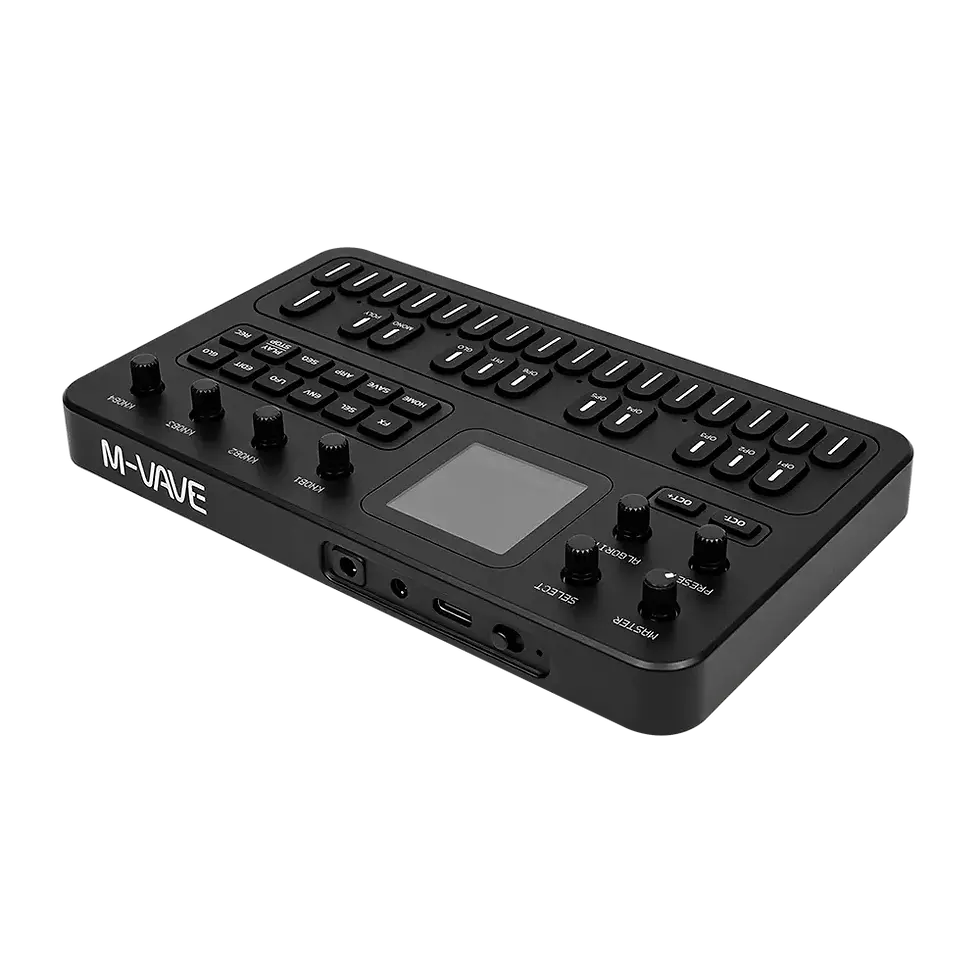
You install stock V16 with M-VAVE's M-UPGRADE app for Windows and macOS and the `FM-1.fwsc` file from the M-VAVE Download Center. Connect the synth straight to the computer by USB and keep it powered the whole time. M-UPGRADE has a Force upgrade option that skips its safety checks. Leave it off for a normal update, because those checks stop you from loading the wrong file.
The stock firmware got here in steps: V09, V13 and V15 came out over the summer of 2026 and added things like BPM sync, Program Change and glide before V16 arrived.
Download and extract the right M-UPGRADE version for your computer.
Download the current stock `FM-1.fwsc` file from M-VAVE.
Switch on the FM-1 and connect it directly by USB.
Open M-UPGRADE and check that it shows your device and its current firmware.
Choose `FM-1.fwsc` when the app asks you to select firmware.
Keep the USB cable in and the synth on until “Upgrade complete” appears.
Also check
FM1 Open V14: the FM-1 as an eight-track groovebox

FM1 Open V14 turns the FM-1 into an eight-track groovebox. Each track uses one of six sound sources: DX7-style FM, 303-style bass, 808-style drums, PSG chip sounds, Pluck or a sampler with eight slots. Every track has its own volume, loop length, mute, solo and reverb and delay sends.
The sequencer works more like a groovebox than the stock one. Steps can hold velocity, note length, probability, chords and parameter locks, and each track can loop over 16, 32, 48 or 64 steps. V14 adds a library of 128 DX7 sounds, a MIDI input channel per track, Tap Tempo and a delay that syncs to tempo. You get 16 demo projects and 16 slots for your own.
You edit and install Open in a browser workbench that needs Chrome or Edge on a desktop computer. The sampler has about 19.55 seconds of memory shared by all eight slots, so think drum hits and short sounds rather than long loops. The code and documentation live in M-VAVE's FM1 Open repository.
With Open, back up projects and samples separately

With FM1 Open, one project file is not a full backup. A project (`.fm1`) doesn't include its samples. Save the sample bank (`.fm1s`) and your DX7 sounds (`.syx`) as separate files too.
The workbench also keeps its own copy of your work in the browser. Use Save to device when you want the changes on the synth, and export important projects to your computer as well. It's easy to miss this when a project still loads fine in the browser.
Switching between stock and Open doesn't convert anything. Stock patterns and Open projects can't be opened by the other system. The workbench can only flash its own Open firmware, and its restore button puts back V15, not V16. To get to V16 after that, run the normal M-UPGRADE update.
Be careful with third-party firmware
Unofficial firmware needs the most care. M-VAVE says newer FM-1 units use a different flash memory chip, and some older third-party firmware doesn't support it. On those units the synth can start and play fine but fail to save, lose sounds after the power is fully cut or block later updates. Seeing SAVED on the screen doesn't prove it works.
Before you try any third-party firmware, back up your FM-1 and only use a release whose author says it supports your flash chip. Installing V15 or V16 first doesn't fix an unsupported release. If something goes wrong, write down the firmware name, version and the messages on screen before you ask for help.
M-VAVE says a failed update doesn't always mean the synth is dead. What you can do depends on whether it still starts and connects over USB. One well-known third-party project is Xfer Records SHRUB, and our article on Xfer Records SHRUB for the M-VAVE FM-1 covers its features and limits.
Which M-VAVE FM-1 firmware should you install?
Pick stock V16 if you bought the FM-1 as a small FM synth and want to play several sounds at once from a keyboard or sequencer. It's the normal firmware, it installs with M-UPGRADE, and it keeps the FM-1 feeling like the synth you bought. Just remap your MIDI effects controls after the update.
Pick FM1 Open V14 if you want the FM-1 to work like a small groovebox with drums, bass, samples and step tricks. Back up projects, samples and sounds separately before you switch, and remember that its restore button goes back to V15, not V16. Leave third-party firmware alone unless its author clearly supports your unit.
Get the current official FM-1 firmware
M-VAVE's Download Center has stock V16, the M-UPGRADE app and the official release notes. Check the file name and the detected device before you start the update.
More information
Frequently Asked Questions
Is stock V16 newer than FM1 Open V14?
No, the numbers belong to two separate firmware lines. Both came out in October 2026, and neither number continues the other.
Does V16 give every FM-1 part 20 notes?
No. The eight parts share 20 notes between them. Busy parts take from the same pool.
Will my old MIDI controller setup work with V16?
Not for the effects. V16 moved the MIDI CC numbers for the effects, so you need to set those mappings again.
Does an FM1 Open project include its samples?
No. A `.fm1` project doesn't contain the sample audio. Save the `.fm1s` sample bank and your DX7 sounds as separate files.
Is third-party FM-1 firmware safe if it starts normally?
Not always. M-VAVE warns that some older third-party firmware can start and play on newer units but fail to save later. Only use a release whose author says it supports your flash chip, and back up first.
ABOUT THE AUTHOR

Kamil
Sound designer, synths and keys
Kamil is our synth and keys guy: if it has black and white keys, he has played it. He grew up on progressive rock and metal and designs sounds for Noise Harmony. His sounds have gone into work with KORG, Arturia, Xfer Records (Serum 2) and many more. Off the clock he plays in his own bands: music is simply his whole life.
FOLLOW US ON


Comments