Serum 2 Granular: How the New Oscillator Works and When to Use It

2 hours ago
12 min read
Of all the changes in Xfer's update, the Serum 2 granular oscillator interests me most. Serum 1 never had anything like it. It cuts any sample into tiny grains and builds them back up as pads, drones and broken textures. You can pick it in any of the three main oscillators, next to four other modes. Below I explain how to switch it on and what Xfer's own documents say the controls do. I also cover when Spectral, Sample or Multisample is the better choice, and how to keep the CPU load under control.
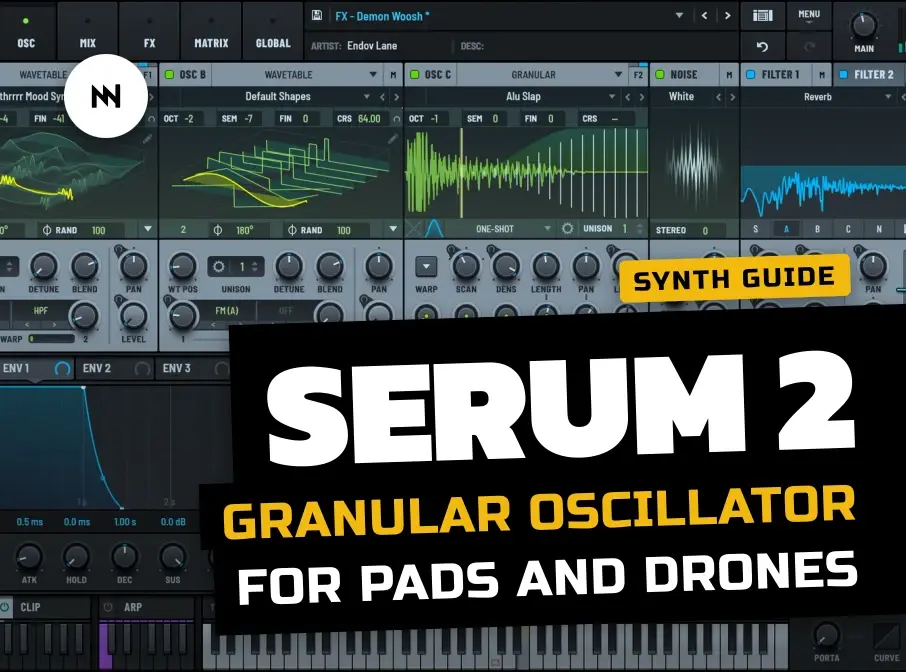
Table of contents
What is the Serum 2 granular oscillator?
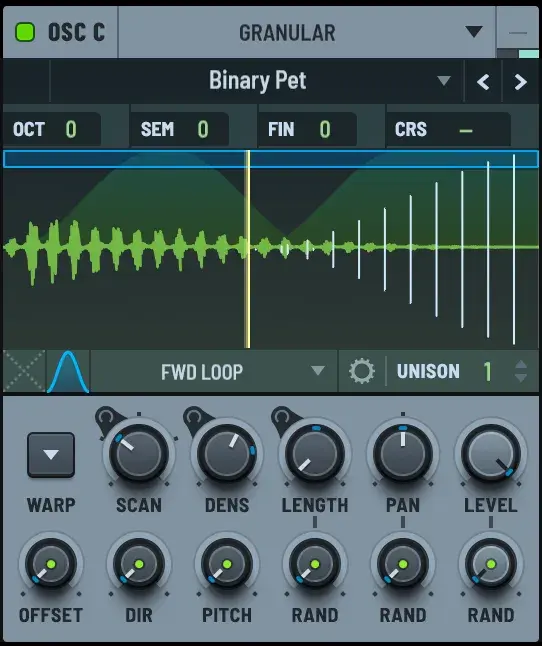
The granular oscillator is one of five modes you can pick for each main oscillator in Serum 2. It builds sound from tiny slices of a sample instead of a single-cycle wave. Xfer's manual calls these slices grains. Serum cuts the audio into grains, then layers, overlaps and recombines them. That lets you stretch, rearrange and reshape a sound into new textures.
According to Xfer's What's New in Serum 2 document, the oscillator can play up to 256 grains. The summary names three controls: Window Amount for the grain's amplitude window, plus Warp and Envelope. The window is the short fade-in and fade-out each grain gets. Its shape decides whether the grain cloud sounds smooth or a bit clicky.
Before Serum 2, most producers used a separate granular plugin when a track needed a frozen vocal pad or a smeared texture. They layered it under Serum on another channel. Now the grain cloud, a wavetable lead and a clean sub can sit in one patch. They share the same modulation and save as one preset. For me, that's the part that matters most in a real session. The idea stays in one place instead of being spread over three plugins on three tracks.
Three oscillators, five engines: what changed from Serum 1

Serum 2 has three main oscillators, OSC A, OSC B and OSC C, where Serum 1 had two. Each one can run in Wavetable, Multisample, Sample, Granular or Spectral mode. The Noise oscillator works as it did in Serum 1, and there is still a dedicated Sub oscillator. Xfer's manual describes the result as wavetable, subtractive, multi-sampled, sampled, granular and spectral synthesis in one workflow. So you could put a granular pad on OSC A and a wavetable on OSC B for body. A multisampled piano could sit on OSC C, all in one instance.
The wavetable engine is still at the heart of it, and Xfer improved it rather than replacing it. A smooth interpolation mode (WT Interpolation) moves through the wavetable without needing morph tables. Dual Warp runs two warp modes at once, with new warps such as true FM and phase distortion from filters.
The octave and semitone controls now have semitone, harmonics, ratio and step modes. Phase Memory sets phase and phase randomization for new notes. You can also copy and paste whole oscillators with or without their modulation. If you want a refresher on how wavetable frames morph, our explainer on how wavetable synthesis works covers the basics and the history.
Your old Serum 1 presets load fully in Serum 2, but Serum 2 presets won't open in Serum 1. Serum 1 is end-of-life, and both versions can stay installed side by side. If you own Serum 1, the upgrade is free, and that includes Serum 1 rented through Splice Rent-to-Own. Our comparison of Serum 1 and Serum 2 goes through project migration and CPU in more detail.
As someone who makes presets for it, I'm glad Xfer left the old wavetable workflow alone. Years of muscle memory still work the moment you open the new version. The new engines sit in a drop-down menu instead of a new interface you have to learn from scratch.
How to switch an oscillator to Granular and load a sample
Turning on Serum 2 granular mode takes two clicks on the oscillator's drop-down menu, and loading audio takes one more menu. The mode selection below follows Xfer's manual, but check the sample-loading steps in the plugin, since the manual's web version doesn't cover them.
Starting with sounds you already know is an easy way to hear grain movement before you start dragging in your own recordings. If the rest of the interface is still new to you, our quick Serum 2 walkthrough for beginners covers the layout first.
Pitch tracking is the other setting to know early. Xfer's web manual and What's New summary don't say how the Granular oscillator behaves with pitch tracking or pitch bend switched off. Check that in the plugin before you build drones and noise beds around it.
Click the drop-down menu of OSC A, OSC B or OSC C and choose Granular. You can also step through the modes with the < > arrows, or hover over the menu and use the mouse wheel.
Check in the plugin whether a sample you used in another mode shows up in the waveform display.
Click the drop-down menu and choose a factory sample.
To use your own audio, load your file from the same menu (check the exact command name in the plugin).
Other file options in the same menu are worth checking in the plugin.
Which samples work best as grain material?

Long, held sounds with plenty of harmonics give the granular oscillator the most to work with. A held vocal note, a string chord or a pad you recorded from another synth all work well. Room tone and steady field recordings also keep their character when Serum scatters them into grains. Short, dry drum hits are harder, because most of the file is silence and many grains land on nothing. Xfer gives similar advice for converting samples to wavetables, where clear harmonic content works best and drums or complex sounds can give unexpected results.
It pays to prepare the file before it goes in. Trim silence at the start and end in your DAW, and bring the level up so the grains don't come out much quieter than your other oscillators. If you want to check a sample inside Serum first, use the Sample oscillator. It has Set Points for start, end and loop points, a Crossfade for smoother loops and slicing in auto and manual modes. The Sample oscillator works well as a first look at new material.
File names matter too. Xfer's support page on root notes explains that Serum 2 reads the root note from the end of the file name. A file called "Analog Lead A#4.wav" maps to A#4, and a file with no note in its name defaults to C3. Serum counts MIDI note 69 (440 Hz) as A3, while some DAWs call that note A4. Rename a file if it plays an octave off. (A good excuse to clean up that folder full of files called "vox final FINAL 3".)
What the Serum 2 granular controls do to the sound
Every granular control answers one of three questions: how long each grain is, how many grains overlap, and where in the sample they read from. The window shape then decides how smooth each grain sounds. Once you hear the controls that way, any granular synth makes sense, and the Serum 2 granular oscillator is no exception.
Grain length and how many grains play
Grain length decides how much of the source each grain carries. Long grains keep words, notes and attacks recognizable. Very short grains lose the source and start to sound like a buzz or a pitched tone. They repeat fast enough to become a frequency of their own. The number of overlapping grains decides how thick the cloud is. Many grains blur into a smooth wash, and few grains sound sparse and stuttery. With 256 grains as the ceiling, Serum 2 has plenty of room for dense pads.
Where in the sample the grains come from
Each grain reads from a point in the sample. If that point stays still, you get a frozen sound, one moment of the vocal held for as long as you hold the key. If it moves, the grains travel through the file, and slow movement can turn a two-second sample into a long, changing drone. This is the control I'd modulate first, because it changes the character the most for the least effort.
Window, Warp and Envelope
Window Amount sets the amplitude window of each grain. A softer window gives a smoother, more blended cloud. A harder one lets clicks and attacks through, which can sound good on glitchy parts. Xfer also lists Warp and Envelope controls on the granular oscillator.
While reading Xfer's documents for this article, I noticed that the HTML web manual only covers the general chapters. The details for each oscillator are in the PDF User Guide, where the "Using Granular Synthesis" chapter starts around page 85. The What's New in Serum 2 PDF covers them as well. If a knob name on your screen doesn't match what you read online, hover over it in the plugin or check that chapter. Xfer keeps updating Serum 2.
Also check
Why granular uses more CPU, and how to keep it light
Granular mode can cost more CPU because every note can run many grains at once. Each grain is a small playback voice of its own. On the good side, Xfer says Serum 2 needs the same or less CPU than Serum 1 for equivalent patches. Some of the new features can need more, though.
Xfer's own guidance on CPU use is short and practical. Keep unison low, because three to seven unison voices per oscillator is often unnecessary. Get width from a chorus on an FX bus instead, since a bus effect runs once rather than once per voice. If you play pads with eight-note chords, every saved voice adds up quickly.
Is a granular pad worth the CPU on a laptop? Usually yes, as long as you print it once the part is written. Freezing or bouncing the track in your DAW turns the grain cloud into plain audio. Your laptop fan can then stop sounding like an extra band member.
Use fewer grains and less overlap if the pad still sounds smooth enough.
Keep unison low, and get width from a chorus on an FX bus.
Send several oscillators to one aux bus instead of putting the same effect on each.
Limit the number of voices for parts that don't need big chords.
Freeze or bounce granular tracks once the part is finished.
Granular vs Spectral, Sample and Multisample (and what Vital offers)

Granular is the mode for textures and stretched, smeared sound, while the other three new modes play or resynthesize a sample more faithfully. Picking the right one saves time and CPU, so here is how they differ according to Xfer.
Spectral analyzes and resynthesizes a sample at the harmonic level in real time, with transient detection similar to the methods used in advanced time-stretching. You get independent control over time and pitch, plus Timbre Shifting. A Scan Rate control sets the speed and direction of playback, and Hi/Low Freqs set the sample's frequency limits. Reach for it when you want a sample stretched or retuned but still recognizable, without the grain cloud's blur.

Multisample plays an instrument recorded across many pitches, velocities and articulations, and Serum uses those recordings across different notes and dynamic levels. It comes with Xfer's own orchestra, choir, piano and guitar recordings and imports SFZ files. You can play a note and choose Switch to Single Sample to move that note into Sample mode. Then use Switch to Wavetable with the Frequency Estimation option to turn it into a wavetable.
The Sample oscillator plays single samples and adds looping with snap loop detection and a Rate control for tape-stop effects. It also has slicing, Tails mode and FM, PD and distortion types.
Vital is the rival most people compare Serum 2 with. Its official site describes wavetable oscillators with spectral warping of a waveform's harmonics, and audio import into wavetables through pitch-splice or vocode. The site doesn't mention granular synthesis or a separate sample-playback oscillator. If grain clouds are what you're after, Serum 2 is the one that lists them. Our Serum 2 vs Vital comparison covers price, modulation and workflow too.
Who should learn granular in Serum 2, and what to keep in mind
Granular mode suits producers who make ambient music, film and game music, melodic techno or anything built on pads and textures. It also suits anyone who likes turning recordings into instruments. If you mostly program basses, plucks and leads from wavetables, you can ignore it for a while. You still get everything Serum 1 gave you, plus the improved wavetable engine. Nothing in the old workflow forces you into the new modes.
There are limits worth knowing. Granular can be heavy on CPU, and the detailed documentation sits in a large PDF rather than the web manual. Collaborators still on Serum 1 can't open your Serum 2 presets, so print the parts as audio before you send a project. Xfer's product page lists only Windows 10 or later and macOS (High Sierra or later on Intel, Big Sur or later on Apple Silicon). It runs in 64-bit VST3, AU or AAX hosts.
If you're new to Serum, the full version is $249 on Xfer's Serum 2 page. It includes 626+ presets and 288 wavetables, and there are demos for macOS and Windows. Owners of Serum 1 get it free, and Xfer promises that lifetime free updates mean exactly that.
Hear it: “Dream Horizon” for Serum
Three sounds from our “Dream Horizon” presets for the Serum. Have a listen before you start turning knobs.
ARP CHROME FLICKERNoise Harmony · Dream Horizon
LEAD HEXA POPNoise Harmony · Dream Horizon
Serum 2 Dream Horizon | 61 PresetsNoise Harmony · Dream Horizon
Presets as a shortcut: open them and see how they're built
One of the fastest ways to learn a new engine is to open a finished preset. Look at which oscillator does what and change one control at a time. A preset shows you a working balance between oscillators, envelopes, modulation and effects, which takes much longer to find from an empty patch. That's why I set up my Serum 2 packs around macros, so you can hear the big moves first and then look underneath.
In Vanilla 33 I built 33 sounds with more than 260 macros between them. Dream Horizon has 60+ presets with custom macros, FX chains and MIDI clips for electronica, trap, ambient and cinematic work. Parallel Dimension covers melodic techno. If you want all of them, the Serum 2 Multiverse Bundle is the bundle option. Our post on how to install Serum 2 presets covers .SerumPack files and manual folders.
Xfer Serum 2 | 30+ Presets | „Vanilla 33”
€14.00€7.00
Buy Now
Xfer Serum 2 | 60+ Presets | "Dream Horizon"
€25.00€12.50
Buy Now
Serum 2 Preset Pack – Vanilla 33 (Noise Harmony) plays through the Vanilla 33 sounds, so you can hear what the macros do before you buy. It's a quick way to judge whether the pack fits the music you make.
A play-through of Vanilla 33, my pack of 33 Serum 2 sounds with more than 260 macros.
Is Serum 2's granular oscillator worth learning?
Yes, if pads, drones or textures play any part in your music. It puts a full grain engine inside the same patch as Serum's wavetables, with up to 256 grains and the same modulation as everything else. Start by switching one oscillator to Granular and loading a held vocal or a wavetable. Then move only the read position until you hear how the sound changes. Next, add a soft window, a slow LFO and a long release. Keep an eye on the CPU meter with lower unison and shared bus effects. If you mostly make wavetable basses and leads, nothing is lost by leaving it for later.
For me, granular is the clearest sign that Serum 2 is more than a bigger Serum 1. I'm curious to see how Xfer keeps developing it in the next updates. What's the strangest sample you've turned into a pad with granular synthesis? Let me know in the comments.
Start from finished Serum 2 sounds
Opening a working preset is the quickest way to see how oscillators, macros and effects fit together in Serum 2. The Multiverse Bundle collects my Serum 2 packs in one place, so you get a large set of sounds to play with and pull apart.
More information
Frequently Asked Questions
How do I turn on granular mode in Serum 2?
Click the drop-down menu of OSC A, OSC B or OSC C and choose Granular from the menu. Then load a factory sample or your own file from the oscillator's menu.
How many grains can Serum 2 play at once?
Up to 256 grains, according to Xfer's What's New in Serum 2 document. More grains give a thicker, smoother cloud, but they also raise CPU use, so you rarely need the maximum.
Can I load my own samples into the Serum 2 granular oscillator?
Yes. Load your file from the oscillator's menu (check the exact command name in the plugin). Long, held sounds with plenty of harmonics give the best results.
Why does Serum 2 granular use so much CPU?
Each note can run many grains at once, and every grain is a small playback voice. Keep unison low, put width effects on a shared FX bus and freeze the track once the part is done.
Does Vital have granular synthesis like Serum 2?
Vital's official site doesn't list granular synthesis. It describes wavetable oscillators with spectral warping and audio import into wavetables through pitch-splice or vocode. If a dedicated granular oscillator matters to you, Serum 2 is the one that has it.
Is Serum 2 a free upgrade for Serum 1 owners?
Yes. Xfer gives Serum 2 free to Serum 1 owners, whether they bought it from Xfer or a reseller. Splice Rent-to-Own users get both versions with the same payment terms. Your Serum 1 presets load fully in Serum 2.
Will my Serum 2 granular presets open in Serum 1?
No. Serum 2 presets won't load in Serum 1. Both versions can stay installed side by side, so keep Serum 1 if you still have older projects or collaborators who use it.
ABOUT THE AUTHOR

Chris
Producer and sound designer, synth sounds
Chris is a producer and sound designer at Noise Harmony. Synth sounds are his strength, and techno, electro and hip hop run in his blood. He has made sounds with Xfer Records (Serum 2), KORG, Arturia and many more, and he is always busy with his own bands. He gave his life to music long ago.
FOLLOW US ON


Comments