How Can You Improve Your Sound Design in Serum 2?

Jan 20
3 min read
Updated: Mar 31
Serum 2 is a powerful tool, but you don't need to spend hours clicking menus to get a great sound. Sometimes, the simplest tricks are the best. Here are five easy Serum 2 tips to speed up your workflow and make your patches sound more professional.
1. Add Vibrato Instantly
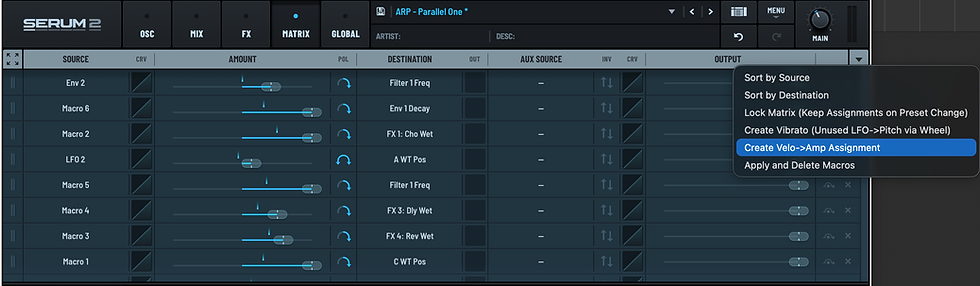
Many producers waste time setting up an LFO just to get a simple vibrato effect. In Serum 2, there is a much faster way. Go to the Matrix tab, look at the top right corner, and click "Create Vibrato." Serum will automatically map your mod wheel to a smooth vibrato. It’s a great way to add expression to your sounds in just one click.

Also check:
2. Control Your LFOs with Macros
Sometimes you want an LFO to start only when you turn a knob. If you just map a macro to the LFO depth, it can still feel a bit "messy." For a cleaner result, go to the Matrix, find your LFO, and put your macro in the AUX Source column. Now, the LFO stays completely flat until you actually turn the macro knob.

Xfer Serum 2 | 155+ Presets | „Multiverse Bundle” [BUNDLE]
€64.00€54.40
Buy Now
3. Make Your Sounds Feel More Natural
If your synth sounds too "robotic," it probably needs more velocity control. A quick way to fix this is to go to the Matrix and select "Create Velo" from the top right menu. This automatically connects your keyboard velocity to the volume. Now, if you play the keys softly, the sound is quiet, and if you play hard, it’s loud - just like a real piano.
Make sure to watch our tutorial on YouTube, where we show all these tricks in action!
4. Use These Two Quick Shortcuts
You don't always have to open the Matrix to change your settings. These two keyboard shortcuts will save you a lot of time:
Flip Direction: Hold Alt + Shift (Windows) or Option + Shift (Mac) and click a parameter to flip the modulation direction.
Quick Bypass: Hold Option + Command (Mac) to temporarily turn off a modulation. This is perfect for checking if a change actually sounds good.

5. Morph Between Two Filters
You can completely change your sound by moving it from one filter to another. Take Macro 1 and map it to the Filter Routing for all your oscillators. Set it so that when the knob is at zero, the sound goes through Filter 1. When you turn it up, the sound moves to Filter 2. This is a very cool way to transform a simple sound into something complex with just one knob.

Summary
For those who want to dive deeper, we have professional Serum 2 packs ready for you:
Parallel Dimension: 63 Melodic Techno presets.
Vanilla 33: 33 presets for Hip Hop and Pop.
Dream Horizon: 61 presets for Cinematic and Trap.
The best way to get everything is the Multiverse Bundle. It features 157 Premium Presets (100% royalty-free) and over 1200 Macros. You get:
8 fully assigned macros and Mod-wheel support for every preset.
MIDI and Audio files + Clips with automations.
Xfer Serum 2 | 155+ Presets | „Multiverse Bundle” [BUNDLE]
€64.00€54.40
Buy Now
Visit noiseharmony.com to download the bundle or the free e-book.





Comments