Line 6 Helix Stadium Routing, Splits and Stereo Explained

Aug 13
7 min read
Most Line 6 Helix Stadium presets run on a single straight line: guitar in on the left, blocks in the middle, sound out on the right. It's a perfectly good way to work, and for a lot of tones it's all you ever need. But the Stadium's routing engine can do far more than one straight path, and once splits, merges and parallel signal flow click into place, a whole layer of bigger, cleaner sounds opens up. The goal here is to understand what routing makes possible, when it actually helps, and when to leave it alone.

Note: This post contains affiliate links. If you choose to buy through them, I'll get a small kickback, at no extra cost to you. It helps me keep Noise Harmony going. Thank you!
Table of contents
What is a path on the Line 6 Helix Stadium?
A path is simply a lane your signal travels through. Helix Stadium has two main processing paths, Path 1 and Path 2, and each one can be divided into sub-paths A and B. That gives you four sub-paths in total: 1A, 1B, 2A and 2B.
One thing to get straight early, because it trips people up. Those are not four fully independent engines. The processing power is shared between the two main paths, not split evenly across all four sub-paths. So think in terms of two main lanes, each of which can branch. When you want to create a sub-path, you drag a block down below the main lane and Stadium opens the branch for you.

Every preset is a path, whether you think about it that way or not. It carries your signal from input to output, and routing is just what happens when you run more than one at a time. Each path also has its own input block, and on Stadium you can choose a different input per path, which means you can run several instruments through one unit. There's even a factory template called Gtr+Bass+Vox+Keys, where each path takes a different source. Plug in to match and you can process guitar, bass, vocals and keys at once, the XL having the extra instrument inputs for it, then balance them all in the Matrix, the mixer view you open with the expand button to set each path's level and pan.
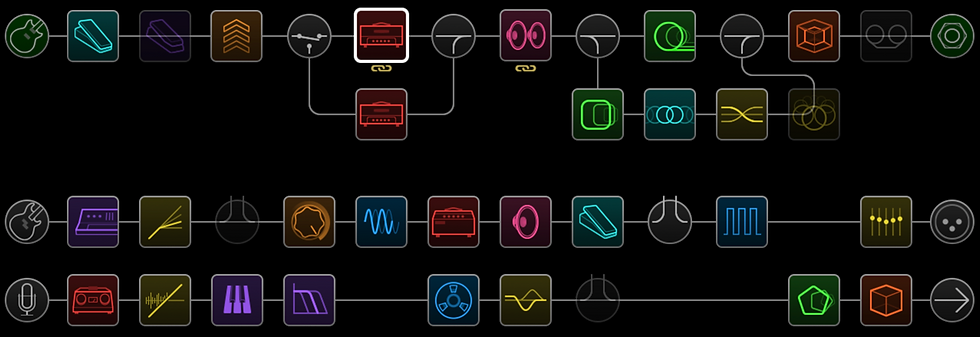
Splits and merges: how Line 6 Helix Stadium routing works
A split does exactly what the name says. It takes your signal and sends it down two paths at the same time, called Path A and Path B after the split point.
By default, Stadium drops in a Y Split, which sends the signal evenly to both paths, and you can adjust the stereo balance between them inside the Y Split block. Here's a quick way to feel what's happening: add a reverb on one of the two paths and set its mix to 100 percent. You'll still hear your dry, un-reverbed signal coming through, because it's traveling down the other parallel path untouched and meeting the wet signal again later. That meeting point is the merge.

A merge is where the paths come back together, and it's always the same block: essentially a small mixer where you set the level, panning and polarity of each incoming path. On that parallel reverb example, the merge is where you dial in how much wet signal blends with the dry. Between the split and the merge, each path can hold completely different blocks, effects and processing. For lush, dimensional reverbs to drop onto a parallel path, our Reflections reverb presets are built for exactly this, and we go deeper on the idea in the secret to high-end reverbs.

The four split types and what they're for
Line 6 Helix STADIUM | 24 Presets | "Aura" & "Reflections" [BUNDLE]
€59.98€50.98
Buy Now
The Y Split is the default, but it isn't your only option. There are four split types, and each one routes the signal a little differently.
The A/B Split lets you distribute the signal between Path A and Path B however you want, all to one side, evenly, or anywhere in between. The Crossover Split divides the signal at a chosen frequency, which is genuinely useful for bass, where you might process the lows and the highs separately. And the Dynamic Split routes based on a threshold level, so your louder and quieter playing can be sent down different paths and treated in different ways. Each one solves a specific problem, and you'll reach for them as those problems come up.
Why parallel routing exists
Parallel routing exists to solve a real problem: keeping two things that fight each other apart.
Say you want a clean, articulate dry tone and a big, washed-out ambient sound at the same time. Stack everything in series and the ambience smears across your whole signal, including the dry attack you wanted to keep sharp. Split it instead, and you can keep one path dry and focused while the other handles delays and reverbs. Both versions play together, but they stop stepping on each other. The same trick is the foundation of serious stereo chains, which is where the Aura delay and modulation pack does some of its best work.
Please consider subscribing to our YouTube channel, it helps a lot.
Connecting paths in series
Parallel is one way to use multiple paths, but it isn't the only one. You can also link paths in series, so one feeds straight into the next.
At the end of each path, in the Output block, you can choose to send that path into another one. Pick Path 2A for the output and arrows appear showing the new signal flow: the top path is processed first, then the bottom path. That lets you build much longer chains than a single path holds, and because the heavy lifting is spread across both main paths, it's a smart way to dodge a DSP overload when a chain gets long.

Understanding this one connection trick lets you build flexible presets without unnecessary complexity, while keeping the unit's processing power in check.
When not to use routing
Here's the honest part. Routing is powerful, but it asks for your attention, and it's easy to overdo. With several paths running, you can genuinely lose track of what's happening to your signal and end up troubleshooting a tangle you built yourself.
So treat it as a creative tool, not a badge of honor. Experiment freely with splits, merges, parallel paths and series links, since playing with them is the fastest way to understand them. But if you start feeling lost, go back to a simpler layout and rebuild from there. Keep an eye on your levels and the overall flow so you stay in control of the sound. A simple preset you understand beats a complex one you're scared to touch.
Also check:
Helix Stadium routing options at a glance
Splits, merges and series links are a lot to hold in your head at once, so here's the whole
set side by side. Each one, what it does, and when to reach for it.
Filter it down to just the split types when you're deciding how to branch a signal, and the choice gets a lot clearer.
Frequently Asked Questions
What is routing on the Helix Stadium?
Routing is how your signal flows through the unit's paths. Helix Stadium has two main paths, each splittable into A and B sub-paths, and you use split and merge blocks to branch the signal into parallel lanes and recombine them. It lets you run effects in parallel, process instruments separately, or build longer chains in series.
How many paths does the Helix Stadium have?
Two main processing paths, Path 1 and Path 2, each of which can divide into sub-paths A and B for four sub-paths total (1A, 1B, 2A, 2B). The processing power is shared between the two main paths rather than split across all four, so think of it as two lanes that can each branch.
What is the difference between a split and a merge on the Helix Stadium?
A split sends one signal down two paths at the same time, while a merge brings those paths back into one. The merge acts as a mixer with level, pan and polarity control over each incoming path. Between them, each path can carry completely different blocks and effects.
What are the four split types on the Helix Stadium?
The Y Split sends the signal evenly to both paths with adjustable stereo balance. The A/B Split distributes it between paths however you set it. The Crossover Split divides it at a chosen frequency, handy for bass. The Dynamic Split routes based on how hard you play against a threshold.
When should I use parallel routing instead of a single path?
Use parallel routing when two parts of your sound would otherwise fight, like a clean dry tone and a heavy ambient wash. A split keeps one path dry and focused while the other handles reverb and delay, so they play together without smearing. For most simple tones, a single path is still the right call.
See the whole series and keep going
That's Helix Stadium routing in practice: paths and sub-paths, splits and merges, the four split types, parallel processing for sounds that would otherwise clash, and series links for longer chains. You don't need to build complex multi-path rigs to get value from this. The point is knowing the tools exist and what each one is for, so you reach for them deliberately.
If you're learning the unit from the ground up, this fits into a ten-part Helix Stadium beginner series on the Noise Harmony YouTube channel, which covers the hardware, presets, blocks, building your first tone, snapshots and, after this, Song View and the Showcase automation engine. Watching the series in order is the fastest way to make it all stick.
When you want presets that already make smart use of parallel routing and stereo, start with our free packs or step up to our premium Helix Stadium presets.




Comments