Line 6 Helix Stadium Presets, Setlists and Templates Explained for Beginners
- Noise Harmony

- 10 hours ago
- 8 min read
Once you can find your way around the unit and read the signal flow, the next thing to sort out is how it actually stores sound. Line 6 Helix Stadium presets, setlists, and templates are the system that keeps your tones organized, and they work a little differently from older Line 6 Helix gear. Get this part right early and everything you build later stays tidy, instead of turning into a pile of half-named copies you're scared to touch.

Note: This post contains affiliate links. If you choose to buy through them, I'll get a small kickback, at no extra cost to you. It helps me keep Noise Harmony going. Thank you!
Table of contents
What is a preset on the Line 6 Helix Stadium?
A preset is the complete description of your sound. When you load one, you're loading an entire virtual rig, from the input jack all the way to the output. Plenty of beginners assume a preset is just an amp setting. It's a lot more than that.
That means the preset holds your full signal chain, every block in it, the order they sit in, and all the parameter values. It also stores the deeper stuff: snapshots, controller assignments, routing across paths, and the output configuration. All of it travels with the preset.
This matters on day one because of how the screen behaves. When you select a preset, everything you see reflects exactly what that preset contains. There's no hidden layer and no separate edit mode. What you see is what you're editing, which is a relief once you're used to units that buried half the settings two menus deep.

Factory presets vs user presets: what's the difference?
Inside the unit, presets split into two groups, and the distinction protects you from yourself.
Factory presets come from Line 6. They're there to show off the amps and effects and give you ideas, and they're read-only: you can play them and pull them apart to see how they're wired, but you can't overwrite or delete them. That's a good thing. It means you can dig through a factory tone, see how it's wired, and never worry about wrecking the original.
User presets are your own library. Helix Stadium gives you 512 empty user preset slots, and that's where everything you make in this series gets saved.
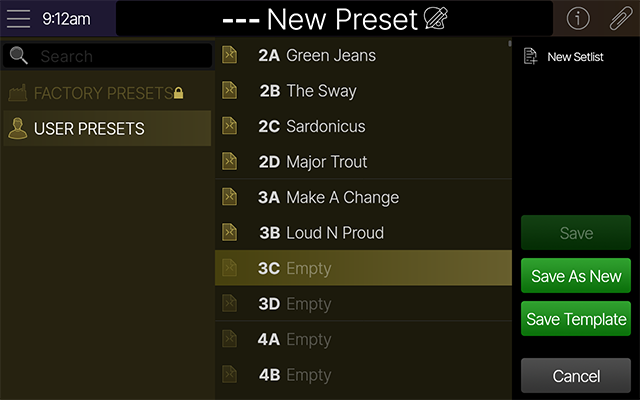
Here's the move that connects the two. Find a factory preset you like, want to tweak it, and you don't have to rebuild it. Select it and double-tap the Save button. Stadium does a quick "Save As New" and drops a fully editable copy into the next free slot in your User Presets folder. Now you can mangle the copy as much as you want while the factory original stays put.
If you want some fresh material to pull apart this way, our free Helix Stadium presets are a good place to start. Load them up, copy one, and see how it's built.
Why Helix Stadium setlists are not just folders
This is the part that trips up people coming from an older Helix, so slow down here for a second.
At first glance a setlist looks like a folder full of presets. It isn't. A setlist is closer to a playlist. Instead of storing copies of your presets, it stores pointers (aliases) to presets that live in your User Presets folder. The preset files themselves stay in one place. The setlist just references them.
Line 6 Helix STADIUM | 24 Presets | "Aura" & "Reflections" [BUNDLE]
€59.98€50.98
Buy Now
That one design choice changes everything. Because a setlist only points at a preset, you can use the same preset in several setlists at once. Picture one core clean tone you rely on across two or three bands. You don't duplicate it three times. You reference it in three setlists.
And then the payoff: when you update that preset, it updates everywhere it's used. Fix an EQ dip, nudge the output level, rename it, and every setlist that references it changes with it. No hunting down five stale copies and trying to remember which one was the good one. Line 6 puts it plainly in the Helix Stadium manual: rename or save changes to a preset and all presets with that name, in every setlist plus the User Presets folder, change too.
The numbers are generous. You can create up to 122 setlists, and each one holds anywhere from 1 to 128 presets. You will not run out of room.
How should I organize my Helix Stadium setlists?
Think in terms of context, not storage.
A setlist is for arranging sounds in the order a real situation needs them. One setlist per band. One for a specific show. One for practice. Each can present the same underlying presets in a completely different order, and none of them duplicate anything.
Here's an example. Say your band plays different show variants. You make separate setlists and, from the Manage Presets screen, fill each one with the presets you need in playing order. Jump between the setlists and you can see they're pulling from the same User Presets database. Adjust any of those presets once and the change shows up in both sets instantly.

That's the whole point. You organize for the gig without ever worrying that the "clean" in one set drifted out of sync with the "clean" in another. Once this clicks, the old folder-based way of working feels clumsy.
Here's the full episode-two walkthrough on the actual unit, if you'd rather watch than read.
Please consider subscribing to our YouTube channel, it helps a lot!
What are templates on the Helix Stadium and why use them?
A template is not a sound you play. It's a starting point.
When you build a new preset, you don't have to begin from an empty chain every time. A template gives you a layout that already makes sense: a routing setup, a set of blocks, even Command Center mapping, ready to go. To reach them, tap the Main Menu icon, then "New Preset," and the Template List appears with all your starting points.
Stadium ships with templates aimed mostly at routing scenarios, things like parallel paths, the 4-Cable Method, and Super Serial. You can also save your own. Say you keep reaching for the same combination of amp, cab, compressor and a drive pedal, or you like running guitar on one processing path and vocals on a second. Build it once, then save it as a template (press Save, then "Save Template") and that structure is waiting for you next time.

The practical win is consistency and less decision fatigue. You're not reinventing the same skeleton every session, which is exactly what you want once you start building several presets for one project.
Also check:
How do favorites and non-destructive editing work?
Two smaller ideas round out the system, and both exist to let you experiment without fear.
Favorites work at the block level. Dial in a reverb or an amp you love, touch the block, and from its action menu choose "Add to Favorites." A save window opens where you can drop the block into a folder if you want, then confirm with "Add New" and name it. From then on that block, with its settings, is one tap away in any chain you build. It's the fastest way to stop rebuilding the same sound from scratch.

The bigger idea is that Stadium is built for non-destructive work. You can duplicate presets, spin up new versions, and try wild ideas without breaking anything. Undo a wrong move. Revert and walk away. And when an action genuinely can't be reversed, the unit warns you first: the Overwrite option, for instance, tells you the destination preset will be permanently deleted before it lets you do it.
You're not supposed to nail it on the first try. The whole system assumes you'll poke at things, and it's designed so poking at things is safe.
Presets, setlists, templates and favorites at a glance
If you only remember one thing, make it this: a preset stores a sound, a setlist organizes sounds, a template starts a sound, and a favorite is a single block you reuse. Everything else follows from that.
Here's the quick reference, including what each one stores and the file type it saves as.
Keep that mental split in your head and the unit stops feeling like a maze. Each concept has one job.
Frequently Asked Questions
What is the difference between a preset and a setlist on the Helix Stadium?
A preset is a complete sound: the full signal chain, parameters, snapshots and routing. A setlist is an ordered list that points to presets stored in your User Presets folder, so the same preset can appear in many setlists at once. Edit the preset and every setlist that references it updates automatically.
How many setlists and presets can the Helix Stadium hold?
You can create up to 122 setlists, and each setlist holds 1 to 128 presets. Your User Presets folder has 512 slots for your own creations. Factory presets sit separately and are read-only.
Can I edit Helix Stadium factory presets?
Not directly, they're read-only. But you can select any factory preset and double-tap Save to do a quick "Save As New," which copies it into your User Presets folder as a fully editable preset. The factory original stays untouched.
What is a template on the Helix Stadium for?
A template is a reusable starting point for new presets: a routing layout and block set you build from instead of starting empty. Reach them via Main Menu, then "New Preset." Stadium includes routing templates like parallel paths and the 4-Cable Method, and you can save your own with "Save Template."
Do presets and setlists work the same on the Stadium and the Stadium XL?
Yes. Presets, setlists, templates and favorites behave identically on both. The XL adds scribble strips and an onboard expression pedal, but the way it stores and organizes sound is the same.
See the whole series and keep going
That's how Helix Stadium organizes sound. You now know what a preset really is, how factory and user presets differ, why setlists point instead of copy, what templates and favorites are for, and how to keep the whole thing non-destructive.
This blog is a summary of episode two of a ten-part beginner series on YouTube. Episode one covered hardware and navigation, and the next episodes move into blocks and signal flow, building your first tone, snapshots, routing, and more. To learn the unit properly, head to the Noise Harmony YouTube channel and follow the series in order.
And once you're ready to load sounds worth playing, you can start with our free packs or step up to our premium Helix Stadium presets.


Comments